
Why Xero Accounting Software for Small Business Is the Smart Choice for Software Conversion
Transitioning your small business to a new accounting software can feel challenging. Choosing Xero accounting software for small businesses may offer more clarity. This cloud-based platform can streamline everyday accounting tasks efficiently. Small businesses may find it easier to track expenses and revenues accurately. Xero accounting software for small businesses may reduce manual bookkeeping efforts. Switching software can appear complex, but it may lead to long-term efficiency. The smart choice often lies in considering automation and accessibility features.
Introduction to Xero Accounting Software for Small Business
Xero accounting software for small businesses offers tools that help small businesses handle their money better. It works online, so you can log in from anywhere. No need to download or install anything.
Here’s why so many small businesses love using Xero:
- You don’t need to be an accountant to use Xero. It’s made for non-finance people too.
- Xero shows you where your money is going instantly. No need to wait for reports.
- Your bank feeds link directly with Xero, so you don’t have to add things manually.
- Create and send invoices in just a few clicks. You also get alerts when someone pays.
- All your data is stored safely and backed up in the cloud.
These features make Xero accounting software for small businesses the right fit for entrepreneurs who want less stress managing their books.
Comparing Business Accounting Software for Small Business
If you’re thinking about switching your accounting software, you may have looked at QuickBooks, FreshBooks, or Wave. But here’s how business accounting software for small businesses compares:
|
Topic |
Xero |
QuickBooks |
FreshBooks |
Wave |
|
Ease of Use |
Very beginner-friendly clean dashboard simple to navigate |
User-friendly but slightly complex More features may overwhelm newbies |
Designed for freelancers Very simple, but not ideal for full businesses |
Basic and easy interface Best for very small businesses |
|
Features |
Strong in automation, invoicing, bank reconciliation, inventory, multi-currency, payroll (as an add-on), and app integrations |
Advanced reporting, job costing, inventory, payroll, and time tracking |
Great for invoicing, time tracking, and expense logging; limited bookkeeping |
Basic invoicing, payments, and reports; lacks inventory & advanced features |
|
Pricing |
Scalable monthly plans Affordable for startups and growing businesses |
More expensive than Xero Extra fees for add-ons like payroll |
Affordable for individuals and freelancers Limited for growing businesses |
Free core features Charges for payment processing and payroll |
|
Ideal For |
Startups, growing businesses, and those needing reliable cloud features |
Small to medium businesses that need deeper financial management tools |
Freelancers, solo service providers, and consultants |
Micro-businesses, or solo entrepreneurs on a tight budget |
|
Mobile App |
Excellent mobile features Supports real-time updates |
Strong mobile experience |
Good mobile features focused on invoicing and time tracking |
Basic app Handles invoicing and receipt scanning |
|
Integrations |
Connects with 1000+ apps, including Stripe, PayPal, Gusto, etc. |
Integrates with major tools like PayPal, Shopify, etc. |
Fewer integrations compared to Xero or QuickBooks |
Very limited integrations |
|
Reporting & Insights |
Robust real-time financial reports and dashboard |
Deep custom reporting capabilities |
Basic reports focused on invoices and expenses |
Limited reporting |
Reasons to Convert to Xero from Legacy Systems
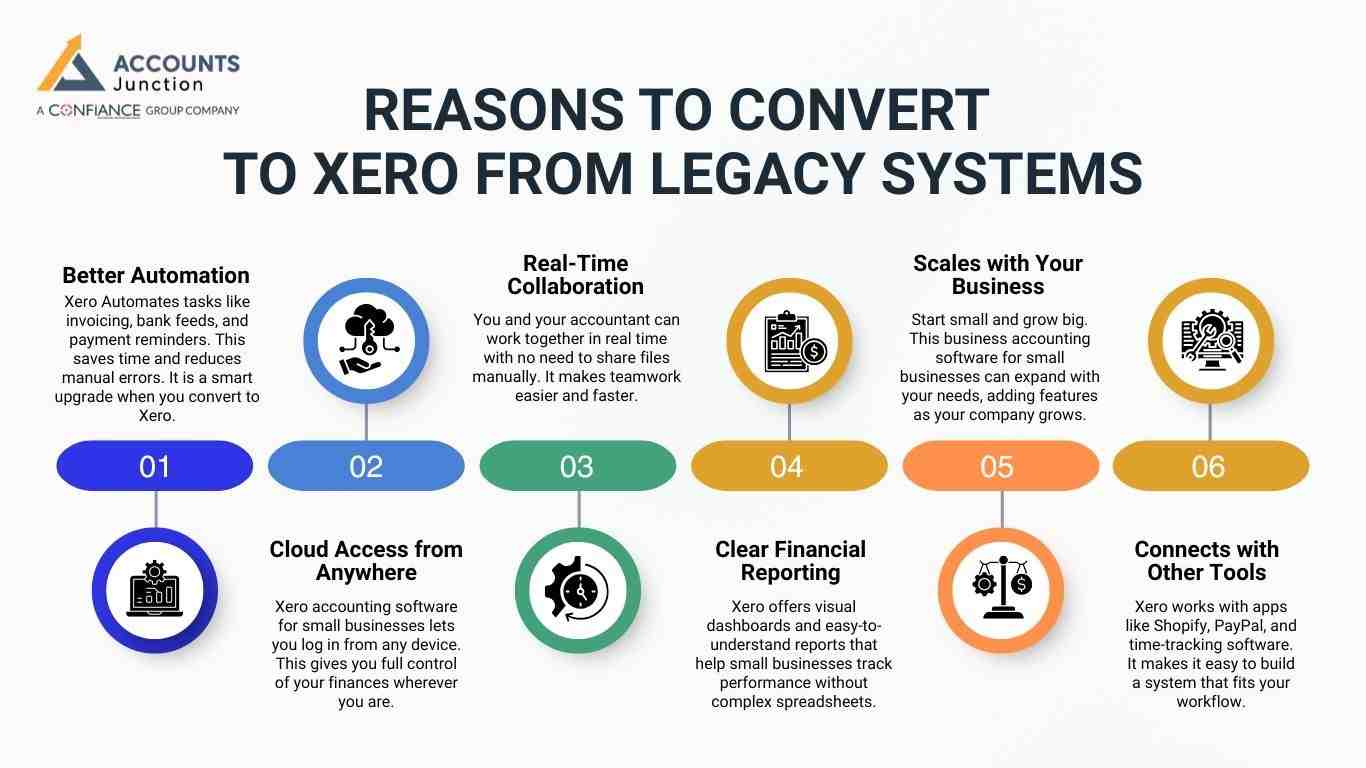
Many small businesses still depend on outdated software or spreadsheets that are hard to manage and result in errors. These systems usually don’t offer cloud access, automatic updates, or real-time collaboration. That’s why many small business owners choose to convert to Xero.
Here are key reasons why it makes sense to make the switch to Xero accounting software for small businesses:
Better Automation
- Xero Automates tasks like invoicing, bank feeds, and payment reminders. This saves time and reduces manual errors. It is a smart upgrade when you convert to Xero.
Cloud Access from Anywhere
- Xero accounting software for small businesses lets you log in from any device. This gives you full control of your finances wherever you are.
Real-Time Collaboration
- You and your accountant can work together in real time with no need to share files manually. It makes teamwork easier and faster.
Clear Financial Reporting
- Xero offers visual dashboards and easy-to-understand reports that help small businesses track performance without complex spreadsheets.
Scales with Your Business
- Start small and grow big. This business accounting software for small businesses can expand with your needs, adding features as your company grows.
Connects with Other Tools
- Xero works with apps like Shopify, PayPal, and time-tracking software. It makes it easy to build a system that fits your workflow.
Preparing Your Data and Team for the Switch
Converting to Xero accounting software for small businesses needs some planning. Even though the switch takes some planning, it helps simplify your accounting later. Follow these steps to make the change go smoothly:
Clean up old data
- Before you convert to Xero, go through your records and make sure everything is correct. Fix any mistakes and remove old or duplicate entries. This helps keep your new system neat and easy to manage from day one.
Back up everything
- Always save a copy of your current accounting data. Whether it’s in Excel, QuickBooks, or any other accounting software, make sure you back it up. This way, nothing gets lost if there’s a problem during the switch.
Inform your team
- Let your employees or anyone who uses your accounting system know about the change in advance. Share the timeline and let them know what to expect. This makes everyone feel ready and helps avoid confusion.
Choose a conversion date
- Pick the right time to switch. Most businesses prefer to convert to Xero at the end of the month or the close of the financial year. This makes it easier to close out your books in one system and start fresh in the new one.
Get help if needed
- If you're unsure about how to move your data, don’t worry. Many professionals specialize in helping small businesses convert to Xero. Getting expert help ensures that the move to the new system is accurate and nothing is missed.
How to Use Xero Accounting Software After Migration
After you convert to Xero, getting started with the platform is simple. Xero is designed to help small business owners take control of their finances from day one.
Here’s how you can begin using Xero accounting software for a small business effectively:
1. Set Up Your Company Profile
- Begin by entering your business details. This includes name, address, logo, and contact info. This helps you personalize invoices and documents.
2. Connect Your Bank Accounts
- Link your bank accounts to Xero so it can automatically import your daily transactions. This feature saves time and reduces errors.
3. Organize Your Chart of Accounts
- Set up categories for income, expenses, assets, and liabilities. This helps you see exactly where your money is coming from and going.
4. Add Users to Your Account
- Invite your accountant, bookkeeper, or team members to access your Xero account. You can control what they see and do.
5. Create Test Invoices and Bills
- Practice sending a few test invoices or entering sample bills to see how the system works before going live.
6. Explore the Dashboard
- The dashboard gives you a quick view of your finances. Such as cash flow, outstanding invoices, and upcoming bills. It’s a helpful place to track everything.
7. Use Mobile Access
- Xero offers apps for phones and tablets. This means you can manage your business accounting anywhere, anytime.
Avoiding Common Mistakes During Software Conversions
When switching from one system to another, it’s easy to miss important steps. A bad move can lead to lost data, confusion, or even financial errors. To make sure your change to Xero accounting software for small businesses goes smoothly, avoid these few mistakes:
Not Backing Up Your Data
- Before you convert to Xero, save a full copy of your current data. This gives you a backup in case anything goes wrong.
Skipping Training
- Don’t assume you or your team will figure it out as you go. Spend time learning how to use Xero properly to avoid confusion and mistakes later.
Moving Too Fast
- Rushing through the setup can lead to errors. Take your time to check each detail before going live with the system.
Leaving Out the Team
- If other people use your accounting system, ask for their input. They may notice things you miss and will feel more confident if they’re involved.
Not Checking Your Data After the Switch
- Once you move your data, review your numbers. Make sure balances, reports, and transactions look correct.
Ignoring the Chart of Accounts
- Make sure your categories match what your business needs. The Wrong setup here can make reporting confusing.
Xero accounting software helps small businesses manage their finances. It is a clear, cloud-based system that makes things easier. When you convert to Xero, you get better automation, real-time access, and simpler reporting.
At Accounts Junction, we provide comprehensive services for small businesses to set up and manage Xero accounting software. Our certified experts ensure a smooth transition and seamless financial management. Partner with us for reliable, professional accounting solutions.
FAQ
1. What is Xero accounting software for small businesses?
- Xero is a cloud-based tool that helps small businesses manage finances. It may simplify accounting and bookkeeping tasks.
2. Why should small businesses switch to Xero from old software?
- Switching to Xero may improve automation, accuracy, and access to real-time financial data.
3. How can Xero help with invoicing for small businesses?
- Xero may automate invoice creation, reminders, and tracking payments to save time.
4. Can Xero reduce manual bookkeeping work for small businesses?
- Yes, Xero may automate bank feeds and data entry, reducing errors and effort.
5. Is Xero suitable for small business owners without accounting knowledge?
- Yes, Xero is designed for beginners and may make bookkeeping less intimidating.
6. Can small businesses use Xero on mobile devices?
- Xero offers mobile apps that may allow business owners to track finances anywhere.
7. How does Xero improve financial reporting for small businesses?
- Xero may provide real-time dashboards and clear reports to track business performance.
8. Does Xero help small businesses with tax preparation?
- Yes, Xero may organize expenses and invoices, making tax filing easier.
9. Can Xero handle multiple business accounts for small businesses?
- Yes, Xero may manage multiple bank accounts and integrate them into one system.
10. How can small businesses migrate data from old accounting software to Xero?
- Data conversion may require cleaning old records, backing up, and importing them into Xero carefully.
11. Does Xero support collaboration between accountants and small business owners?
- Yes, Xero may allow real-time collaboration with accountants without file sharing.
12. Can small businesses integrate Xero with other tools?
- Yes, Xero may connect with apps like Shopify, PayPal, and time tracking software.
13. How does Xero handle recurring bills for small businesses?
- Xero may automate recurring payments and help manage monthly expenses efficiently.
14. Can small businesses track inventory using Xero?
- Yes, Xero may monitor stock levels, update automatically, and reduce manual errors.
15. Does Xero offer security features suitable for small businesses?
- Xero may provide encryption, backups, and access control to protect financial data.
16. How does Xero scale as a small business grows?
- Xero may add payroll, multi-currency, and advanced reporting as the business expands.
17. Can Xero help small businesses improve cash flow management?
- Yes, Xero may track unpaid invoices and outgoing bills, improving cash flow visibility.
18. Does Xero provide customer support for small business users?
- Yes, Xero may offer guides, tutorials, and online support to help small business owners.
19. How long does it take for a small business to start using Xero?
- Setup may take a few hours to a few days, depending on data migration and customization.
20. Is switching to Xero cost-effective for small businesses?
- Xero may save time, reduce errors, and scale with business needs, making it a smart investment.