
What Is Online Bookkeeping? A Simple Guide to Cloud-Based Bookkeeping
Many firm owners today ask what is online bookkeeping and how it can help their firm manage finances fast. It is a way to keep financial books online. To understand what is online bookkeeping, note that it replaces slow paper-based work with fast digital tools. Digital tools help firms track cash quickly and easily. Using online bookkeeping solutions, owners can track cash, bills, and profits anytime from any device.
Cloud tech has changed bookkeeping. Cloud-based bookkeeping stores records safely online and reduces mistakes. Learning how online bookkeeping solutions work saves staff time and keeps books correct each day. Online bookkeeping services explained make it easier for owners to pick the right software and tools.
Understanding what is online bookkeeping
Understanding what is online bookkeeping helps firms stay accurate and save staff time daily. Firms no longer rely on paper or manual logs. It tracks cash inflow, outflow, and bills automatically. Using online bookkeeping solutions, books stay accurate and updated daily.
How It Differs from Old Ways
Learning how online bookkeeping works shows why it is faster, accurate, and less error-prone than old methods. With cloud-based bookkeeping, updates happen instantly and records stay accurate across all devices. Cloud access allows staff and owners to work together. It also reduces the need for office space or files.
Understanding what is online bookkeeping helps owners see past records anytime online. Teams can review past transactions quickly using online bookkeeping solutions for better planning. Teams make quick choices with correct money data online. It helps plan spending, cash, and work more right.
Core Features of Online Bookkeeping Tools
Core features explain what is online bookkeeping and how the tools work daily.
-
Fast Updates
Data updates instantly on all devices for quick access. Owners can make decisions with the latest numbers fast.
-
Safe Cloud Storage
Books are stored securely using online bookkeeping solutions on trusted cloud servers. Firms avoid data loss or local hardware problems.
-
Auto Reports
Profit, loss, and balance reports are made automatically. Reports can be shared with staff or partners easily.
-
Expense Sorting
All cash out is grouped into the correct categories automatically. Helps track costs accurately and prepare reports quickly.
-
Many Users Access
Staff can check or edit books at the same time. Team collaboration becomes simple and smooth with cloud access.
-
Bank Links
Bank accounts link to web tools for real-time updates. This reduces manual entry and keeps books accurate always.
How Online Bookkeeping Works
To clearly understand what is online bookkeeping, think of it as managing business books using secure cloud software. All financial data is updated online in real time and is easy to access.
-
Add Data
This is a key step in how online bookkeeping works, where transactions are recorded digitally for instant updates. Data is saved instantly in the cloud for safety.
-
Bank Feeds
Bank transactions import automatically into online bookkeeping tools software. This saves staff time and avoids manual errors.
-
Sort Transactions
Understanding how online bookkeeping works shows how transactions are categorized for quick reporting.
-
Check Books
Bank records are checked against online books every month. Wrong or missing entries are identified and corrected quickly.
-
Make Reports
Month, quarter, and yearly reports are made automatically online. Owners can review profit and cash flow easily.
-
Team Work
Books can be shared with staff or business partners instantly. Teams can make decisions faster with real-time data.
Types of Online Bookkeeping Tools
These options help owners learn what is online bookkeeping in real use.
-
Full-Service Online Books
This option suits owners learning what is online bookkeeping with expert help. Saves owners' time and reduces manual work effectively.
-
DIY Tools
DIY tools help owners understand what is online bookkeeping step by step. Low cost and simple setup work well for small firms.
-
Hybrid Tools
A combination of software and expert review ensures books stay accurate. Auto work with expert checks keeps records correct always.
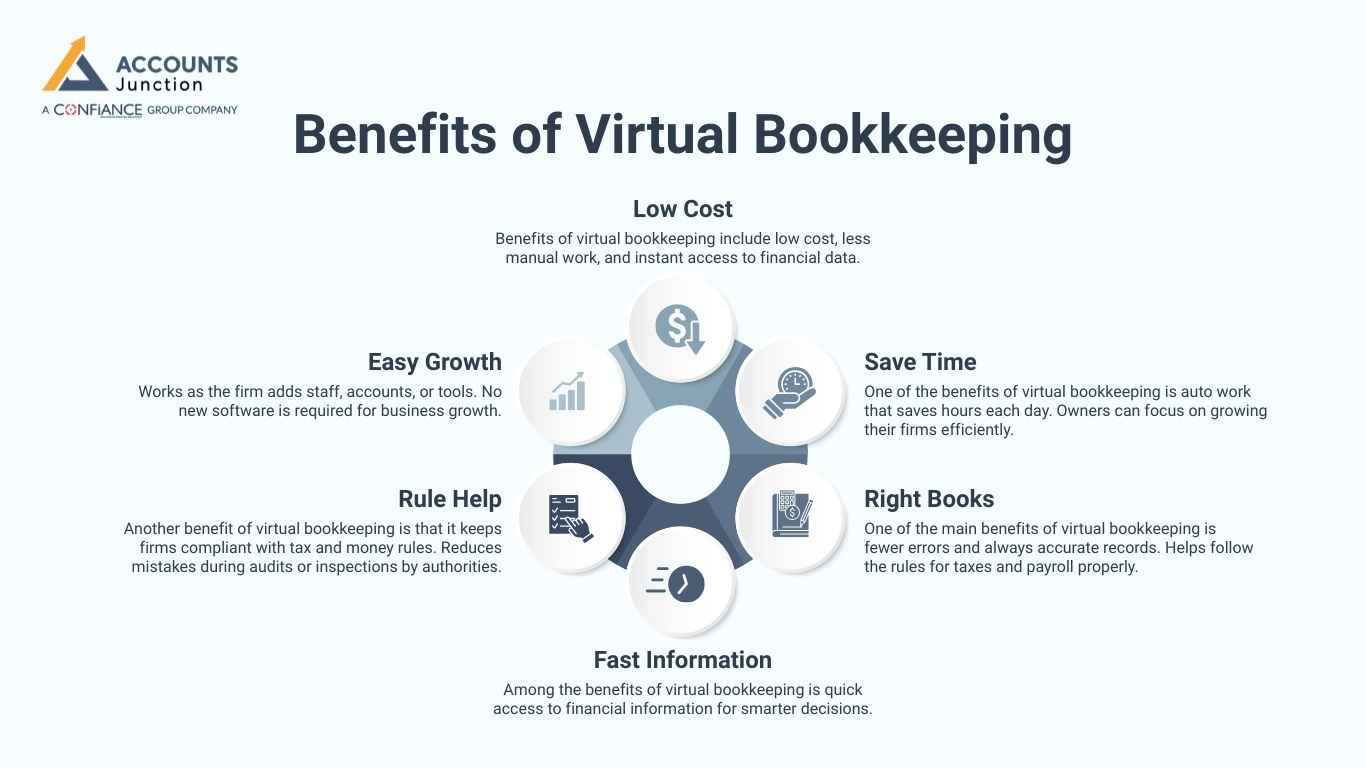
Benefits of Virtual Bookkeeping
Knowing what is online bookkeeping helps owners see these low-cost benefits clearly.
-
Low Cost
Benefits of virtual bookkeeping include low cost, less manual work, and instant access to financial data.
-
Save Time
One of the benefits of virtual bookkeeping is auto work that saves hours each day. Owners can focus on growing their firms efficiently.
-
Right Books
One of the main benefits of virtual bookkeeping is fewer errors and always accurate records. Helps follow the rules for taxes and payroll properly.
-
Fast Information
Among the benefits of virtual bookkeeping is quick access to financial information for smarter decisions.
-
Rule Help
Another benefit of virtual bookkeeping is that it keeps firms compliant with tax and money rules. Reduces mistakes during audits or inspections by authorities.
-
Easy Growth
Works as the firm adds staff, accounts, or tools. No new software is required for business growth.
How Online Bookkeeping Helps Small Firms
-
Track Cash
Knowing what is online bookkeeping helps firms track cash fast online. Online bookkeeping services explained guide owners on using tools for accurate cash tracking.
-
See Cash Flow
Knowing what is online bookkeeping helps owners see money inflows and outflows clearly.
. Helps plan spending and budget effectively for upcoming needs.
-
Digital Storage
No paper or file storage is required in offices. All records are safe and encrypted in the cloud.
-
Work Remotely
Owners can access books anytime from anywhere without delays. Works well for staff in multiple office locations
Cloud-Based Bookkeeping
-
No Hardware
Cloud-based bookkeeping requires no extra hardware, as the cloud handles storage and backups automatically.
-
Auto Updates
Software updates automatically online without staff intervention or delay. Ensures users always have the latest features and fixes.
-
Backups
Cloud-based bookkeeping ensures automatic backups, so data is safe even during accidents. Firms recover quickly after accidental data loss or errors.
-
Team Work
With cloud-based bookkeeping, many staff can work on books at the same time. Coordination between owners and staff is smooth and easy.
Pick the Right Online Bookkeeping Tool
-
Fit With Tools
Check if the new tool works with the current tools easily. Avoid workflow issues or reporting delays for smooth operations.
-
Data Safe
Check encryption and login safety for cloud tools. Keeps financial information secure and private for all staff.
-
Price Plan
After learning what is online bookkeeping, check the tool costs before subscribing. Avoid hidden fees or unexpected extra charges later.
-
Support
Reliable help resolves problems quickly when needed urgently. Keeps business operations smooth and staff work uninterrupted.
-
Growth Ready
Strong online bookkeeping solutions grow easily as the firm adds staff and users. Accounts, reports, and users can be added without issues.
Common Errors in Online Bookkeeping
-
Skip Updates
Not logging transactions regularly causes books to fall behind. Daily updates help keep all records correct and clear.
-
Wrong Sort
Wrong transaction categories make reports confusing and hard to read. Proper sorting helps budgets and planning remain simple.
-
Unsafe Tool
Free or weak tools may risk financial data loss. Trusted software protects money and business information securely, always.
-
No Training
Staff without training may make mistakes despite online tools. Proper training ensures smooth and accurate bookkeeping operations.
-
No Backup
Skipping backups risks permanent loss of important data. Cloud backups prevent disruption during accidental data loss incidents.
Integration With Other Business Tools
-
Connect With Accounting Software
Online bookkeeping can link with many money tools easily. Links save time and avoid repeat work for staff.
-
Connect With Payment Systems
Client or bank payments update in the books on their own. This helps track money fast and avoid mistakes.
-
Connect With Inventory Tools
Stock and inventory updates in the books are automatically online. Owners can see costs and sales without delay.
Security Measures in Online Bookkeeping
-
Encryption
All money records are locked on cloud servers safely. Keeps data safe from hackers or unwanted access.
-
User Roles
Staff or accountants get different rights to use books. Limits access to sensitive money info for safety.
-
Two-Factor Authentication
An extra login step gives more safety for all users. Protects books from hackers or online threats effectively.
Cost Comparison Between Online and Offline Bookkeeping
-
Lower Software Cost
Online bookkeeping costs less than hiring full-time staff. Small firms save money and keep working smoothly.
-
No Hardware Cost
No servers or drives needed for online bookkeeping tools. Cloud handles storage and backup fast and safely.
-
Pay-As-You-Go Options
Some tools allow a monthly payment for using the system. Online bookkeeping services explained show which plans suit small and growing firms.
Environmental Impact
-
Paperless Records
No paper files are needed with online bookkeeping tools. Online bookkeeping services explained in detail show how firms save resources and stay organized.
-
Reduced Travel
Owners and staff can work from home easily. Cuts fuel use and lowers carbon impact a lot.
-
Energy Efficiency
Cloud servers use less power for storing data. Helps firms be green while keeping books safe online.
Knowing what is online bookkeeping helps firms shift to online books. Online bookkeeping solutions save time, cut mistakes, and provide clarity. Benefits of virtual bookkeeping include fast updates, correct records, and lower costs. Cloud-based bookkeeping keeps books safe and allows teams to work. Knowing how online bookkeeping works and reading online bookkeeping services explained helps owners select the right tools.
At Accounts Junction, we help businesses set up accurate, secure online books. Our certified experts follow all rules to keep your records safe. Serving firms worldwide, we offer trusted bookkeeping that brings peace of mind. Partner with us today!
FAQs
1. What is online bookkeeping?
- Online bookkeeping keeps firm records on cloud tools. Owners can check cash, bills, and reports anytime.
2. Is online bookkeeping safe for firm data?
- Yes, data is stored with strong cloud security. Login rules and backups keep records protected.
3. How does online bookkeeping save time?
- Bank data loads into books on its own. Reports are ready fast without manual work.
4. Can small firms use online bookkeeping?
- Yes, it works well for small and new firms. Low-cost tools help manage books with ease.
5. Do I need staff training for online bookkeeping?
- Basic training helps staff avoid common errors. Most tools are simple and easy to learn.