
Run Your Business Better with an Accounts Payable System
Managing accounts payable is a must for every business. It includes checking bills, approving payments, and paying vendors on time. If done by hand, it takes more time and can lead to mistakes. That’s why many firms now use an accounts payable system.
With a smart system, you can track bills, cut down on errors, and pay vendors faster. These tools help with reports and cash flow. Many businesses now use accounts payable automation software to save time and work more efficiently.
What Are Accounts Payable?
Accounts payable is money your business owes to suppliers for goods or services received. It’s a short-term debt that must be handled well to avoid late fees and keep your suppliers happy.
A good accounts payable system helps track due dates, manage vendor details, and prevent delays. When done right, it keeps cash flow steady and vendors satisfied.
Why Your Business Needs a Strong Accounts Payable System
A strong payable system does much more than just track your bills. It works as a full tool to manage how your business handles money owed to vendors.
First, it stores all your payment records in one place. You no longer have to dig through folders or search emails for due dates or vendor info. This saves time and lowers the chance of missing payments.
Second, it checks each bill for common mistakes. It flags things like duplicate entries, missing details, or wrong amounts. This means fewer costly errors and more peace of mind.
Third, it lets you stay ahead on payments. With smart alerts and payment reminders, you’re less likely to pay late or forget a due date. On-time payments mean no late fees and stronger ties with your vendors.
A well-set accounts payable system helps you stay in control. It builds trust with vendors, improves your cash flow, and gives you a better view of where your money is going.
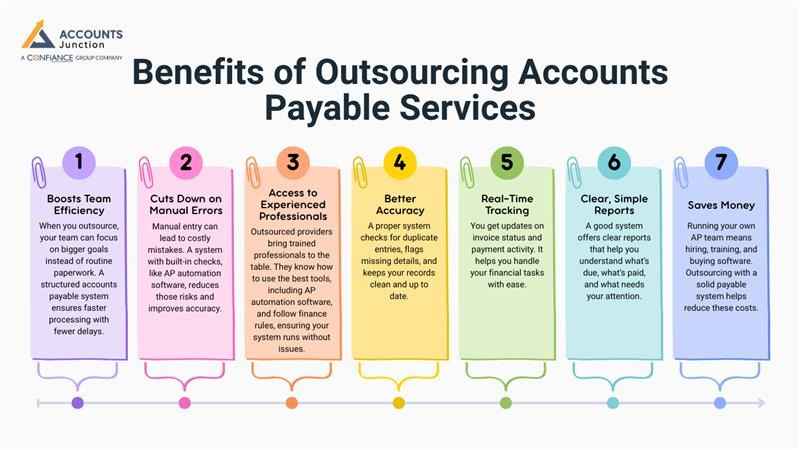
Benefits of Outsourcing Accounts Payable Services
Outsourcing accounts payable means letting experts handle tasks like bills, approvals, and reports. This helps save time and money.
1. Boosts Team Efficiency
- When you outsource, your team can focus on bigger goals instead of routine paperwork. A structured accounts payable system ensures faster processing with fewer delays.
2. Cuts Down on Manual Errors
- Manual entry can lead to costly mistakes. A system with built-in checks, like AP automation software, reduces those risks and improves accuracy.
3. Access to Experienced Professionals
- Outsourced providers bring trained professionals to the table. They know how to use the best tools, including AP automation software, and follow finance rules, ensuring your system runs without issues.
4. Better Accuracy
- A proper system checks for duplicate entries, flags missing details, and keeps your records clean and up to date.
5. Real-Time Tracking
- You get updates on invoice status and payment activity. It helps you handle your financial tasks with ease.
6. Clear, Simple Reports
- A good system offers clear reports that help you understand what’s due, what’s paid, and what needs your attention.
7. Saves Money
- Running your own AP team means hiring, training, and buying software. Outsourcing with a solid payable system helps reduce these costs.
Key Features of an Accounts Payable System
|
Feature |
Description |
|
Invoice Scanning |
The system scans and stores each bill to cut down on hand typing. This saves time and stops data mistakes. |
|
Payment Timers |
It sets alerts so bills are paid on time, not late. On-time pay helps avoid fees and keeps vendors happy. |
|
Action History |
Every step in the process is tracked and saved. This helps with audits and clears up any issues. |
|
Vendor Info |
All vendor names, terms, and contacts are saved in one spot. You don’t have to search through old files. |
|
Simple Reports |
The system makes clean, easy-to-read reports. You can spot trends and plan for future costs. |
|
Error Alerts |
It flags wrong or repeated entries before you pay. This lowers risk and keeps the books in good shape. |
|
Mobile Access |
Let's you check bills and send approvals from your phone. Great for teams who work from many places. |
|
Role-Based Control |
You can set who can see or change certain data. Helps protect your files and stops wrong edits. |
In-House vs. Outsourced Accounts Payable
|
Point |
In-House Team |
Outsourced with System |
|
Cost to Set Up |
You must hire staff, buy tools, and train them. |
Low fee each month. No need to train or hire. |
|
Work Quality |
It can be slow and depends on your team. |
Fast and done by skilled pros. |
|
Reports |
Often made in Excel or old tools. |
Clean reports are sent to you often. |
|
Growth Fit |
It may not grow well as your needs grow. |
Grows with your business. Easy to scale. |
|
Use of Tools |
May lack new tech. Often slow or basic. |
Uses smart, modern tools. Linked to your other systems. |
|
Error Rate |
More chance of small mistakes. Missed bills or wrong info are common. |
Less risk of error. Tools help check for wrong or missing data. |
|
Time to Process |
Tasks take longer when done by hand. Reviews and checks add to the delay. |
Fast process with tools. Bills move from scan to payment with less wait. |
|
Cash Flow View |
Hard to track due dates and plan pay cycles. |
You get alerts and reports to track cash and plan spending with ease. |
Why Choose Accounts Payable Automation Software for Your Business?
Using accounts payable automation software helps your business save time and work more efficiently. It cuts out many slow, manual tasks. You can scan bills, approve payments, and track vendors with ease.
Save Time
- This software handles steps that would take hours by hand. It moves bills from scan to payment much faster. Your team can then focus on more important work.
Fewer Mistakes
- Manual work often leads to errors. You may miss a payment or type the wrong amount. Accounts Payable Automation Software checks for these issues and stops them before they cause harm.
Stay on Track
- With built-in alerts, you won’t miss payment due dates. You also get fast updates and clear reports, so you always know what’s going on.
Easy Reports
- The system shows your accounts payable data in a clean, simple way. You can spot trends, track spending, and plan ahead with less effort.
Build Stronger Vendor Ties
- Vendors like fast, on-time payments. With automation, you pay them on time and keep a strong, clear line of contact. That builds trust and avoids issues.
In short, accounts payable automation software makes your team faster, your books cleaner, and your vendors happier. It's a smart way to grow and stay in control.
Common Challenges in Accounts Payable Management
Even with the best tools, challenges can arise. Delays may happen, or invoices may pile up. Knowing what to expect helps you plan ahead.
1. Late Approvals
- Bills often sit waiting for approval. This can cause payment delays and unhappy vendors.
2. Missing Data
- Sometimes, invoices arrive with missing or unclear details. This may lead to errors if not checked.
3. Duplicate Payments
- Without a clear record, you might pay the same bill twice. Systems with alerts help stop this.
4. Lack of Visibility
- When data is spread across many files, it’s hard to track what’s paid and what’s due.
5. Manual Entry
- Typing each line by hand takes time and raises error risk. Automation can ease that pressure.
Facing these issues is normal, but solving them early can help your business stay strong and steady.
How to Choose the Right Accounts Payable Partner
Picking the right firm to handle your accounts payable isn’t about speed alone. It’s about trust, skill, and fit.
1. Check Their Experience
- Go for a provider who has worked with your type of business. Industry know-how can make a big difference.
2. Ask About Security
- Money data must be safe. Make sure they use secure systems and clear access rules.
3. Look for Transparency
- They should keep you updated with reports and alerts. You need to know where your money goes.
4. Review Tools Used
- Modern tools mean faster, smoother work. A firm using automation is likely more efficient.
5. Consider Support Quality
- When questions come up, you’ll want quick, clear help. A good team will guide you at every step.
When you find the right partner, your payables may shift from messy to smooth in no time.
The Future of Accounts Payable Systems
The future of payable systems looks bright and fast. As tech keeps changing, automation grows smarter every year.
AI and Smart Matching
Systems can now match invoices with orders on their own. They may even catch small errors before you see them.
Cloud-Based Access
You can approve payments anywhere, anytime. The data stays synced and safe in the cloud.
Predictive Insights
Future systems might show you trends or forecast cash needs. This helps you plan smarter.
Paperless Workflows
The paper pile is fading fast. Digital invoices and e-payments make the process green and simple.
Stronger Data Protection
As rules tighten, systems may include built-in safety layers to keep data private and secure.
The next wave of accounts payable tools could bring more speed, less stress, and better control than ever.
Managing accounts payable the right way ensures smooth operations and steady growth. Accounts Junction provides reliable and efficient AP management services tailored to your business needs. Our certified experts handle every process with accuracy, ensuring vendors are paid on time and records remain organized. Partner with us to simplify your payables and strengthen your financial growth.
FAQs
1. What is an accounts payable system?
- It’s a setup that records, tracks, and manages all payments your business owes to vendors. It helps you handle bills, due dates, and reports in one place.
2. How does an accounts payable system work?
- The system collects invoices, checks details, and sends payments once approved. It may also create reports and store vendor data safely.
3. Why should a business use an accounts payable system?
- It can make payment work faster, cut manual errors, and help track every bill. You stay more organized and avoid late payment issues.
4. What are the main features of an accounts payable system?
- Invoice scanning, payment reminders, vendor tracking, and report creation are key. Some also offer mobile access and built-in fraud checks.
5. How does automation improve accounts payable?
- Automation may remove most of the manual steps. It checks, processes, and tracks bills faster while reducing human error.
6. What problems can an accounts payable system solve?
- It may fix slow approvals, missing invoices, and duplicate payments. It keeps your payment process smooth and transparent.
7. How can automation help manage vendor relationships?
- By sending payments on time, it builds trust and avoids tension. Vendors may stay more loyal when they are paid without delay.
8. Is an accounts payable system safe to use?
- Yes. Most systems come with strong encryption, access control, and data backups to keep your records secure.
9. Can small businesses benefit from AP automation?
- Absolutely. It can save them hours of manual work and help them manage bills even with a small team.
10. How does an accounts payable system support cash flow planning?
- It tracks every due date and payment record, helping you plan spending better and avoid short cash cycles.
11. What’s the difference between manual and automated accounts payable?
- Manual work takes more time and risks mistakes. Automation handles the same process faster, cleaner, and with fewer errors.
12. How does outsourcing accounts payable services work?
- You let a team of experts handle invoice processing, approvals, and reports for you. They use automation to keep things accurate and on time.
13. What are the cost benefits of AP outsourcing?
- You may save on staff pay, software costs, and training expenses. Outsourcing gives you professional service without big setup fees.
14. What reports can an accounts payable system create?
- It can show unpaid bills, payment trends, vendor records, and spending summaries. These reports help you make smarter financial choices.
15. How can AP automation reduce fraud risk?
- It checks for duplicate or fake invoices and verifies user access. The built-in audit trail keeps all actions traceable.
16. What is invoice matching in accounts payable?
- It’s when the system compares the invoice with the purchase order and delivery note. Only matched data gets approved for payment.
17. Can AP automation handle international payments?
- Yes, many systems can manage global currencies, tax formats, and multi-country vendors.
18. How can AP systems improve audit readiness?
- They store every approval, note, and payment record. Auditors can check these digital logs anytime without digging through paper.
19. What happens when an invoice is wrong?
- The system flags it for review and stops payment until it’s fixed. This keeps records clean and vendors paid correctly.
20. How fast can automated systems process invoices?
- It can take a few minutes, depending on your setup. Manual entry might take hours for the same work.
21. Can AP automation connect to existing accounting software?
- Yes, most modern systems link well with tools like QuickBooks, Xero, or Tally for smooth data flow.
22. How does automation help remote teams?
- It allows staff to review and approve invoices from anywhere. All actions sync in real time for smooth teamwork.
23. What should I look for in an AP system provider?
- Check their experience, support quality, security, and ease of use. The right partner should fit your workflow and business size.
24. Can AP systems handle tax compliance?
- Many include tax fields and formats for local and global rules. This helps ensure payments stay compliant.
25. How can an accounts payable system grow with my business?
- It scales as your invoices and vendors increase. You can add users, expand reports, and process higher volumes with ease.