
Most Popular Cloud-Based Financial Software for Businesses
Managing finances well is important for both individuals and businesses. The best financial software helps track and manage money. It makes managing funds easy and fast. Nowadays, cloud-based financial software, one of the most popular types of financial software, is gaining popularity because it is flexible and easy to use. This article will help you learn more about different types of financial software and how they can help you.
What is Financial Software?
Financial software helps track money. It shows income, costs, and savings. It works for both personal and business needs. Cloud software is even better because you can access it anywhere. Many tools also help with budgeting, tax filing, and syncing bank accounts, making it easier to manage money.
Types of Financial Software
Many types of financial software serve different purposes. Here are the main types:
1. Accounting Software
- Helps businesses and people track money, income, and expenses.
- Makes it easier to create reports for taxes and business decisions.
2. Personal Finance Software
- Made for people who want to track their spending, saving, and investing.
- Helps with creating budgets and setting financial goals.
3. Budgeting Software
- Focuses on helping people or businesses create and stick to budgets.
- Tracks spending and ensures financial goals are met.
4. Cloud-Based Financial Software
- View your financial data on any device with internet. Get updates in real time, anywhere. You can check it anytime, from any place.
Cloud-Based Financial Software for Businesses
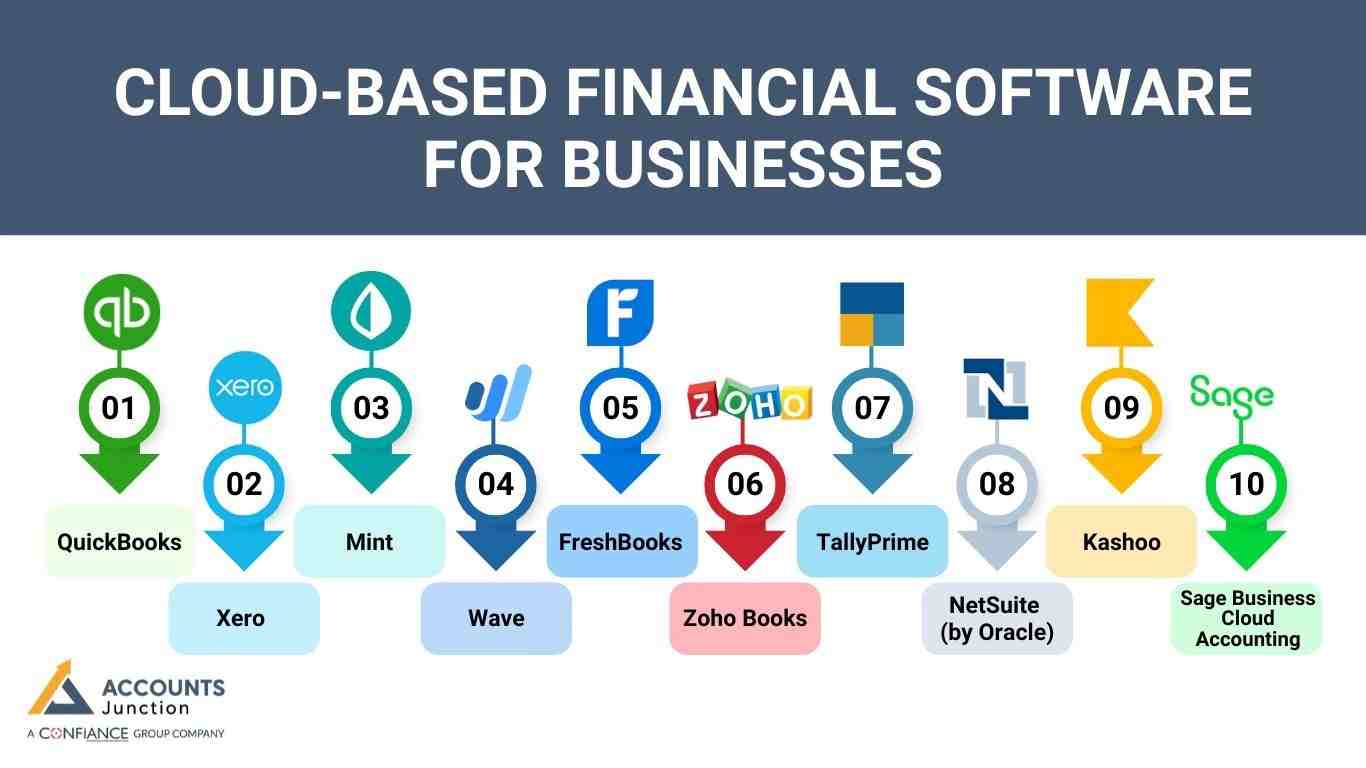
There are many best financial software options on the market, including popular cloud-based financial software solutions. Some of the top choices are:
QuickBooks – A popular tool for small firms to manage finances.
Best for: Small to medium businesses
- Invoicing and billing
- Payroll and taxes
- Expense tracking and reports
- Desktop and cloud access
Xero – A tool made for startups and remote teams.
Best for: Startups and small businesses
- Bank sync in real time
- Track inventory and jobs
- Integrates with 800+ apps
- Fully cloud-based
Mint – A simple app for personal budgeting and goals.
Best for: Individuals and families
- Budget tools
- Track credit score
- Sync accounts in real-time
- Set alerts and goals
Wave – A free accounting tool for freelancers and small firms.
Best for: Wave software is best suitable for freelancers, consultants, and small businesses
- Invoicing and bookkeeping
- Scan receipts and track costs
- Payroll (extra)
- Cloud-based
FreshBooks – Great for pros who track time and bill clients.
Best for: Self-employed pros and service firms
- Time and bill tracking
- Manage expenses
- Financial reports
- Cloud access
Zoho Books – A good tool for small firms that need automation.
Best for: Small businesses seeking automation
- GST and tax filing
- Project billing and bank sync
- Automate workflows
- Cloud and mobile
TallyPrime – A reliable tool for businesses needing local compliance.
Best for: SMEs with local needs
- Manage stock
- GST tools
- Payroll
- Desktop with remote access
NetSuite (by Oracle) – A complete tool for large firms.
Best for: Medium to large businesses
- ERP, CRM, and finance tools
- Advanced reporting
- Scalable and flexible
- Fully cloud-based
Kashoo – A simple tool for small firms and beginners.
Best for: Small businesses and freelancers
- Easy setup
- Smart transaction sorting
- Track income and expenses
- Cloud-based
Sage Business Cloud Accounting – A great choice for small firms managing cash.
Best for: Small and growing businesses
- Invoice tracking
- Bank sync
- Cash flow forecasting
- Fully cloud-based
Why Choose Cloud-Based Financial Software?
Cloud-based financial software offers many benefits. Here are the main reasons to choose it: it’s simple, effective, and saves time.
1. Access Anywhere
- View your financial data on any device with internet. It’s great for checking your finances when traveling or in other places.
2. Security
- Cloud providers use security, like encryption, to protect data. Updates help keep your info safe from hackers.
3. Automatic Updates
- Cloud-based software updates itself automatically.
- You won’t need to worry about manually installing updates.
4. Cost-Effective
- Cloud-based financial software usually charges a monthly or yearly subscription fee.
- You only pay for the features you use, which can save you money.
5. Team Collaboration
- Multiple users can access and update financial data at the same time.
- Good for businesses with remote teams or those working with financial experts.
Benefits of Cloud-Based Accounting for Businesses
Cloud-based accounting software does more than just track finances. It allows businesses to save time, reduce errors, and gain instant insights into their financial health.
Teams can collaborate seamlessly, even when working from different locations. Reports can be generated quickly, helping business owners make informed decisions.
Additionally, cloud-based accounting reduces the need for physical paperwork, keeping offices organized and clutter-free.
Quick Access to Reports Anytime
- Access financial reports from anywhere with an internet connection.
- Receive real-time updates, ensuring that the data is always current.
Reduced Manual Mistakes
- Automated calculations help minimize errors.
- Less manual data entry decreases the chances of inaccuracies.
Better Collaboration for Teams
- Multiple team members can work simultaneously on the same platform.
- Remote access allows collaboration from any location without delays.
Less Paperwork, More Efficiency
- Digital storage significantly reduces physical clutter.
Faster document retrieval saves time and streamlines workflow.
Key Features to Look for in Financial Software
When selecting the best financial software, ensure it includes essential features found in top cloud-based financial software.
1. Ease of Use
- Select software that’s easy to set up and explore. Look for clean designs and straightforward features.
2. Customization
- Pick software that fits your needs. Look for features like custom invoices, reports, and dashboards.
3. Automation
- Pick software that automates invoicing and expense tracking. This saves time and cuts errors.
4. Real-Time Updates
- Cloud-based financial software should give real-time updates. This is key for teams that need constant access to data. It helps businesses stay on track and make fast decisions.
5. Security
- Strong security is key, with encryption and backups. Make sure the software protects your data.
6. Integration
- The software should work well with other tools, such as payroll or CRM software.
- This ensures smooth operations across all your tools.
7. Customer Support
- Choose software with good customer service.
- Look for support options like phone, live chat, and helpful guides.
How to Choose the Best Financial Software?
To pick the best financial software, consider these factors:
1. Size of Your Business
- Small businesses can use tools like Wave or FreshBooks. Bigger ones may need tools like QuickBooks or Xero.
2. Budget
- Compare prices of software and choose one that suits your budget and requirements.
3. Essential Features
- Make sure the software has the tools you need, like invoicing or tax reports. You don’t need to pay for features you won’t use.
4. Scalability
- Pick software that grows with your business. Select tools that expand with your growing needs.
Common Mistakes to Avoid When Using Financial Software
Even the best financial software will not be effective if it is not used correctly. Businesses often make mistakes that can hinder efficiency and accuracy. Avoiding these mistakes can ensure that the software delivers its full potential.
Keep Data Accurate and Updated
- Regularly update financial records to reflect the current status of your business.
- Avoid outdated entries, as they can lead to incorrect decision-making.
Use Only Necessary Features
- Do not overcomplicate tasks by using unnecessary features.
- Focus on tools that are relevant to your business needs.
Enable Security Settings
- Activate strong security measures to protect sensitive financial data.
- Limit access to confidential information to only authorized personnel.
Regularly Back Up Financial Information
- Schedule frequent backups to prevent data loss.
- Utilize cloud backup options for secure and reliable storage.
Choosing the right financial software ensures efficient money management. Cloud-based solutions offer security, flexibility, and regular updates to meet business needs. At Accounts Junction, we provide services using cloud-based accounting software for accounting and bookkeeping, with a user-friendly design and advanced features to improve your financial processes. We have certified experts to ensure your accounts are accurately managed. Partner with us to streamline your business finances.
FAQs
1. What is cloud-based financial software?
- Cloud-based financial software is online software that helps track income, expenses, and overall finances from any device with internet access.
2. How does cloud accounting software work?
- It stores all your financial data online and updates it in real-time. You can manage money, create invoices, and generate reports without installing software on your computer.
3. What are the main benefits of using cloud-based financial software?
- It saves time, reduces errors, improves collaboration, and provides instant reports. You can access data anywhere, making financial management easier.
4. Can small businesses use cloud-based financial software effectively?
- Yes, small businesses can manage accounting, invoicing, payroll, and reporting efficiently using cloud software without hiring a big accounting team.
5. Is cloud-based financial software suitable for large enterprises?
- Yes, large businesses can use it to handle complex accounts, multiple departments, and global operations while keeping all data secure and synchronized.
6. How secure is cloud-based financial software?
- Most software uses strong encryption, secure servers, and regular updates to protect your data from hackers and unauthorized access.
7. Can cloud financial software integrate with other business tools?
- Yes, it can connect with payroll systems, CRM software, inventory tools, and payment gateways to make financial management seamless.
8. Does cloud-based accounting software help with tax filing?
- Yes, many tools can prepare tax-ready reports, track deductible expenses, and make filing taxes faster and easier.
9. How does cloud-based software simplify bookkeeping?
- It automates tasks like data entry, invoice tracking, and expense categorization, reducing errors and saving time.
10. Can multiple users access the same cloud accounting software?
- Yes, teams can work together in real-time, with access controls to keep sensitive information safe.
11. Can I track invoices and payments using cloud financial software?
- Yes, you can create, send, and track invoices, as well as monitor payments from clients in one place.
12. How does cloud software support budgeting and expense tracking?
- It lets you set budgets, categorize expenses, track spending, and receive alerts if you go over your limits.
13. Does cloud-based financial software support multiple currencies?
- Many tools support multi-currency transactions, making it easier for businesses that work with international clients.
14. Can I access my financial data from mobile devices?
- Yes, most software has mobile apps so you can check accounts, send invoices, and monitor finances on the go.
15. Are financial reports customizable in cloud-based software?
- Yes, you can create reports tailored to your needs, such as profit and loss, cash flow, or tax summaries.
16. How often is cloud financial software updated?
- Updates are usually automatic, adding new features, improving security, and fixing bugs without interrupting your work.
17. Can cloud accounting software automate recurring transactions?
- Yes, it can automatically handle repeat payments, subscriptions, and invoices, saving time and reducing mistakes.
18. How do I choose the right cloud-based financial software for my business?
- Consider your business size, budget, required features, and whether it supports growth and integration with other tools.
19. Does cloud software help improve cash flow management?
- Yes, by providing real-time data, tracking receivables and payables, and generating cash flow reports, it helps you plan better.
20. What features should I look for in cloud-based financial software?
- Look for security, multi-user access, mobile apps, reporting tools, tax support, integration options, and automation features.