
How to Do Online Payroll Processing: A Step-by-Step Guide
Online Payroll Processing has become easier and faster with the help of digital tools. Whether you're a small business owner or a growing company, managing payroll online saves time and reduces errors. As a small business owner or entrepreneur, you started your business following your passion to do what you like. You want to carve a niche for your business and make a living from it. In this blog, you will learn how to do online payroll processing in the simplest way.
You also have to take care of other administrative tasks and compliances. And one such thing is payroll processing. This blog explains how to do online payroll processing and how to use an online payroll calculator.
What is Online Payroll Processing?
Online Payroll Processing means paying your employees using digital software or a cloud platform. It includes calculating wages, deducting taxes, and depositing salaries into employee bank accounts. You don’t need to do this manually. A good payroll system does most of the work and calculations for you. An online payroll calculator can also help you do these calculations for accurate payroll processing.
Managing accurate pay at the right time is crucial, as without paying your employee, you can’t get your job done. Payroll processing is simply the calculation of how much money you owe to your employees at the end of the payment period.
How to Process Payroll?
1. Use Payroll Software
- Payroll software automates salary calculations, tax deductions, and compliance requirements.
- It reduces errors and saves time, making payroll management efficient.
2. Outsource to a Payroll Service Provider
- A payroll service provider handles salary processing, tax filings, and employee benefits.
- This is a cost-effective and hassle-free option for businesses.
3. In-House Payroll Expert
- Hiring a payroll professional ensures that payroll processing is handled internally.
- This option is reliable but can increase administrative costs.
4. Do It on Your Own
- Managing payroll manually requires a deep understanding of tax laws and compliance.
- It is time-consuming and prone to errors, making it less practical for business owners.
The best option for payroll processing is payroll software or outsourcing to a payroll service provider. These are the most cost-effective options and ensure compliance. However, if you can opt for an in-house payroll service provider, it can add to your administrative costs and is expensive.
The last option you have is doing it on your own, which is not a viable option unless you are a payroll professional. And also, you won’t like to waste your valuable time on the tedious and time-consuming task of payroll processing.
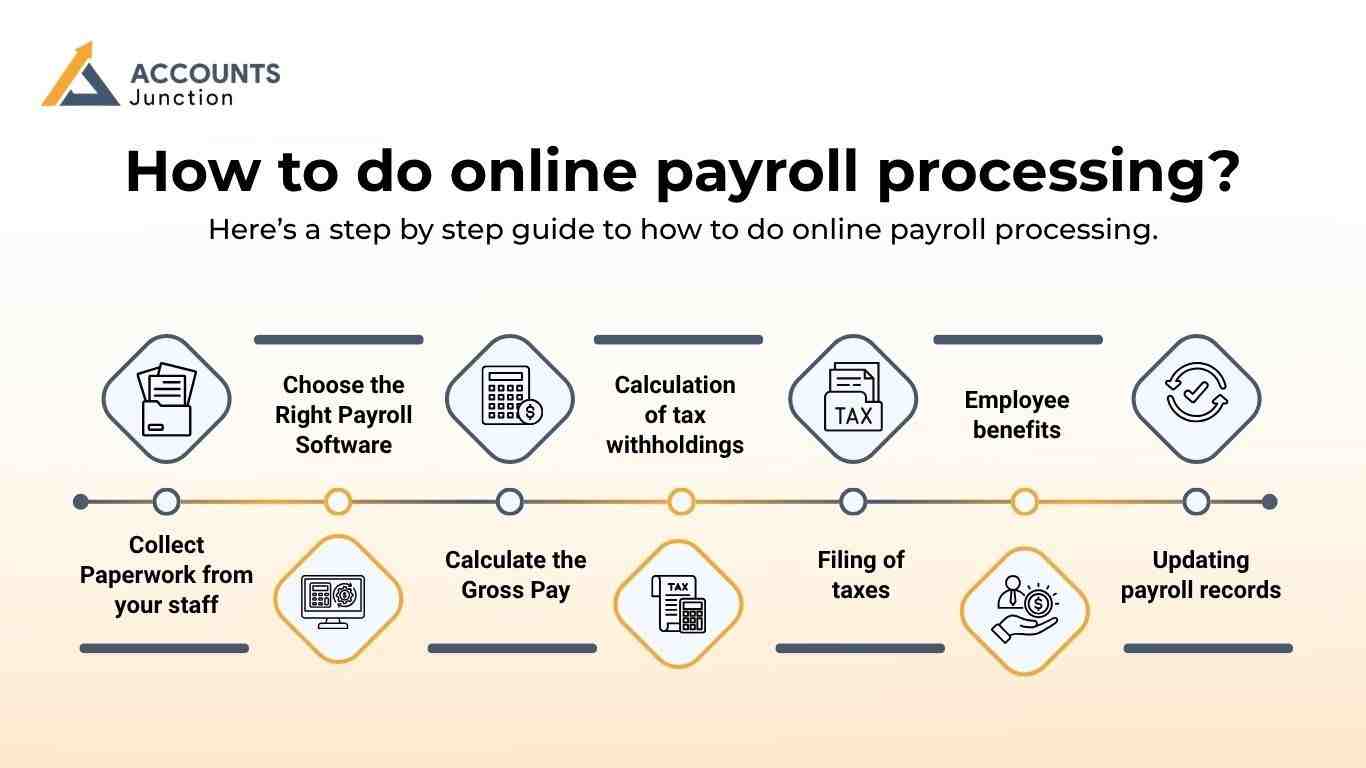
How to do online payroll processing?
Here’s a step by step guide to how to do online payroll processing:
Collect Paperwork from your staff
The first step in payroll processing is to obtain important employee information. Ask your staff/employees to fill out the necessary form along with tax forms. You also need to take care of the required paperwork and documents according to state and federal laws.
Choose the Right Payroll Software
Pick a trusted online payroll processing system. Look for features like:
- Automatic tax calculation
- Employee self-service
- Direct deposit option
- Reports and payslip generation
- Integration with accounting tools
Some popular payroll tools also offer a built-in online payroll calculator.
Calculate the Gross Pay
You need to calculate each employee’s pre-tax earnings for the pay period. If you have a salaried employee, then you need to divide the annual salary by the number of gross pay periods. For workers, you need to multiply the wage rate by the number of work hours. For salaried employees, gross pay is fixed per period. You can use an online payroll calculator to check calculations.
Calculation of tax withholdings
The third step in payroll processing is the calculation of tax withholdings. As an employee, you must calculate your employee salary after withholding payroll taxes and make necessary deductions. You must comply with federal and state tax laws and compute tax accordingly.
Processing of payments to the employees
After all the calculations and necessary deductions, the next step is paying either via checks or direct bank transfer.
Filing of taxes
Filing payroll taxes is the next step. You need to file taxes from withholdings of your employees’ pay to the government.
Employee benefits
You need to invest the deduction made from the employee’s pre-tax earnings into various benefits and retirement schemes. This plan may include retirement plans, healthcare plans, health savings accounts, etc.
Updating payroll records
Updating payroll records is the final step of payroll processing. It reflects the latest payroll that is processed. You must maintain a proper record of information about employee wages and salaries, tax forms, overtime records, payment records, and more for audit purposes.
Handling payroll processing is a tiresome and time-consuming process. Moreover, as your company grows, it becomes more complicated with the additional workforce.
Benefits of Using an Online Payroll Calculator
A good online payroll calculator saves time and avoids mistakes. Here are the top benefits:
- Accurate pay calculation
- Quick tax deduction estimate
- Easy breakdown of wages and benefits
- User-friendly tools
- Helpful for businesses with changing workforce
You can access these calculators for free or within your payroll software.
Online Payroll Processing helps make employee payments fast and easy. From collecting data to paying salaries and filing taxes, everything is smooth when you use good payroll software. With the help of an online payroll calculator, you can avoid errors, save time, and stay compliant. Now, you will no longer wonder how to do online payroll processing as the above-mentioned guide might have cleared all your doubts.
Accounts Junction has years of expertise and knowledge in handling the payroll processing and taxes for clients. Our professionals are well-versed and equipped with the latest payroll processing software and are updated with employment rules and regulations. Contact us now if you want online payroll processing services for your business.
FAQs
1. What is online payroll processing?
- It is the use of digital software to manage employee salaries and tax deductions.
2. Is an online payroll calculator accurate?
- Yes, it provides quick and correct pay and tax estimates.
3. Can I use online payroll tools for small teams?
- Yes, they are perfect for businesses of all sizes.
4. Do I need to file taxes manually?
- Most payroll software files taxes automatically.
5. How often can I run payroll?
- You can run payroll weekly, bi-weekly, or monthly.
6. What if I make a mistake in payroll?
- You can edit it in your payroll system and reprocess the payment.
7. Is online payroll processing safe?
- Yes, most systems use strong encryption and backups.
8. How to do online payroll processing?
- Pick a payroll tool. Add worker info, pay rate, and tax data. The tool makes the pay, sends it to staff, and saves the record.
9. Why use an online payroll calculator?
- It helps find gross pay, tax, and net pay fast. You get clear results with no hard math. It cuts human error and saves time.
10. What are the steps to process payroll?
- Get staff forms, choose the tool, add pay info, and check taxes. Then send the pay and file taxes on time.
11. Can I run payroll on my own?
- Yes, but it takes time. You must know tax laws and keep files right. A payroll tool makes this task easy.
12. What are the main perks of payroll tools?
- They save hours, cut errors, and track taxes. They also give reports and pay slips with ease.
13. Is an online payroll calculator free?
- Most are free. Some are part of paid plans. Try the free one first to see if it fits your need.
14. What data do I need for payroll?
- You need staff names, tax IDs, bank info, and work hours. You also need pay rates and bonus data.
15. Can an accountant help with payroll?
- Yes, they can set it up, fix slips, and check tax. They make sure your data is right.
16. How long does payroll take online?
- Once set, it takes a few mins per run. The first setup may take more time.
17. Why is online payroll better than manual?
- Online payroll is quick, neat, and less prone to error. Manual work takes long and can cause slips.