
Five Tips for Selecting The Right Virtual Bookkeeper
Running a business means keeping track of money and reports. Many firms spend too much time on bills and accounts. This work can take focus away from growth. A virtual bookkeeper can handle records, payments, and reports from a remote place. They help keep your books clear and correct. But selecting the right virtual bookkeeper is key. The right choice keeps your books clean and on time. The wrong one may cause mistakes or stress later.
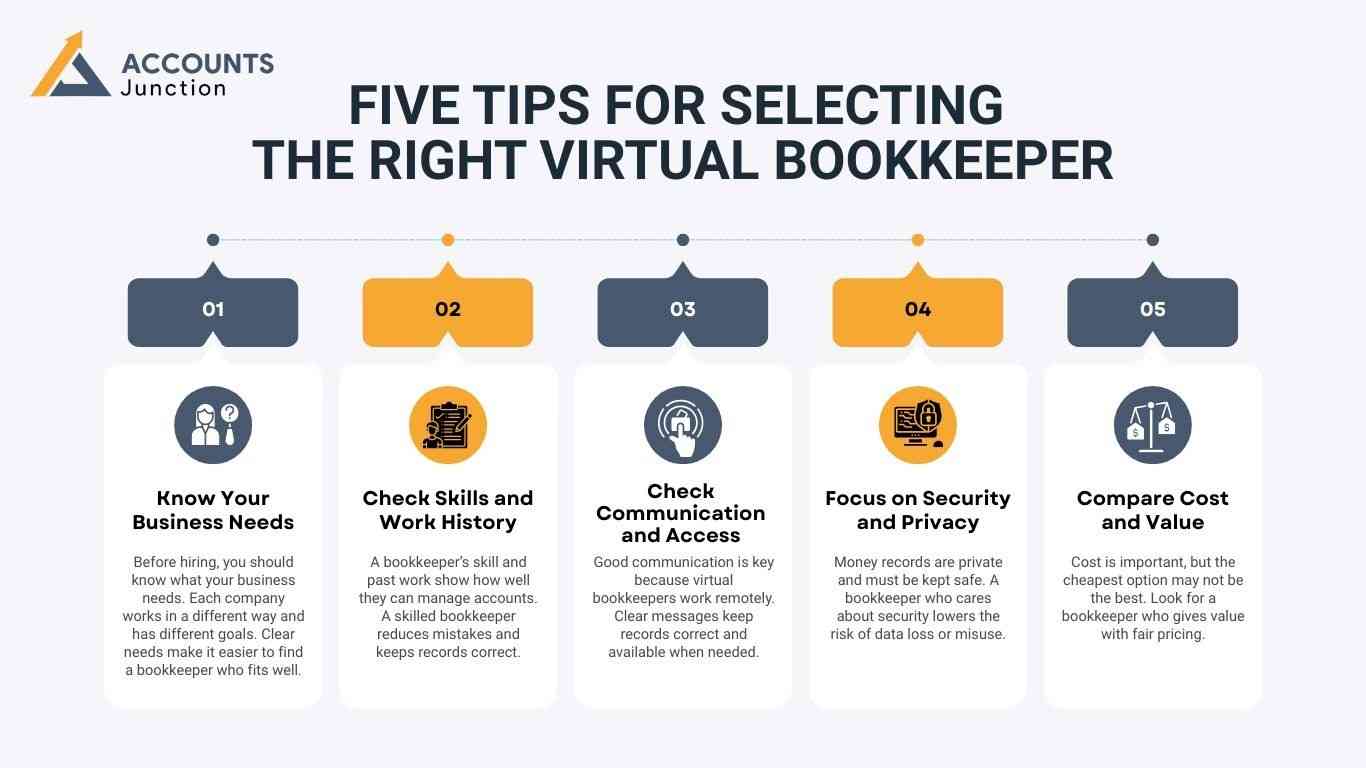
1. Know Your Business Needs
Set Clear Goals:
-
Before you hire, know what your firm needs. Each company has a different setup and plan. When goals are clear, it’s easy to find a bookkeeper who fits well.
Define Scope of Work:
- List what the bookkeeper will do each month: record deals, make reports, or pay bills. Clear tasks stop confusion and save time for both sides.
Count Your Records:
- Check how many deals you handle in a month. Big firms need someone fast and exact. Small ones may need more care and detail.
Plan Report Time:
- Decide how often you need reports, weekly or monthly. Clear dates help the bookkeeper plan work and share updates on time.
Check Special Needs:
- If your firm deals with stock, many currencies, or tax rules, note these early. It helps you find a match who knows your setup.
Knowing your needs is the first step in selecting the right virtual bookkeeper who fits your way of working.
2. Check Skills and Work History
- See Their Skills:
Check if the bookkeeper has training or a valid certificate. It shows they can manage records the right way. - Know the Industry:
If they have worked in your field, they already know tax rules and key terms. This helps keep records more exact. - Software Know-How:
Most firms use Xero, QuickBooks, or Zoho Books. A bookkeeper who knows your tools can save time and avoid small slips. - Review Past Work:
Ask for past client views or a short demo. This shows if they work with care and meet set dates.
Reviewing skills and past work is vital when selecting the right virtual bookkeeper for your business.
3. Check Communication and Access
Good contact is key since virtual bookkeepers work online. Clear talk helps keep reports right and quick to find.
- Quick Response:
Check how fast they reply to calls or emails. Quick answers help fix small issues before they grow. - Simple Reports:
Reports should be easy to read and clear to all. Good reports save time and guide sound business steps. - Team Fit:
They may need to talk with your staff or tax team. Smooth teamwork makes tasks fast and error-free. - Be Available:
Pick someone who can work well during the tax or the month-end rush. This helps reduce stress and keeps books up to date.
Clear contact and easy access are musts when selecting the right virtual bookkeeper for your firm.
4. Focus on Security and Privacy
Your money data must stay safe. A good bookkeeper will care about data safety and follow rules.
- Safe Storage:
They should use cloud tools with locked access. This keeps your files safe from loss or misuse. - Privacy Terms:
Ask for a signed privacy form. It builds trust and keeps your firm’s data safe. - Follow the Law:
They must follow tax and data rules to avoid fines or loss. - Keep Backups:
Make sure files have backups that can be restored. It helps you stay ready if data gets lost.
Security and privacy are key parts of selecting the right virtual bookkeeper to guard your firm’s data.
5. Compare Cost and Value
Price matters, but the cheapest may not be the best. Focus on skill, trust, and value.
- Clear Pricing:
Rates should be easy to read, hourly or fixed. Avoid deals that hide extra costs. - Full Service:
Check if the plan covers all key tasks. Hidden add-ons can make cheap options costly. - Quality Counts:
Paying a bit more for skill saves time and errors. - Plan for Growth:
Pick a bookkeeper who can take on more work as you grow. This ensures smooth updates and steady results.
Balancing cost, value, and skill is key when selecting the right virtual bookkeeper for your firm.
Additional Factors to Selecting The Right Virtual Bookkeeper
- Client Feedback:
Ask past clients for their views or short reviews. Their words show if the bookkeeper is skilled and can be trusted. Good reviews mean they keep clean books and meet set dates. - Trial Work:
Start with a short test job before you hire full-time. It helps you see their speed, care, and how well they talk with your team. A trial task cuts risk and builds trust fast. - Use of Technology:
Pick a bookkeeper who uses cloud tools like Xero or QuickBooks. Such tools keep data safe and easy to view at any time. Tech-based work also saves time and stops small errors. - Problem Solving:
Hire someone who spots and fixes issues quick. Good problem skills keep your books right and stress low. They should also guide you on how to stop the same fault again. - Growth Ready:
Your firm may grow, so choose a bookkeeper who can take on more work later. A growth-ready pro can scale with your needs and help you plan better for the next step.
Benefits of Hiring a Virtual Bookkeeper
- Time Savings
A virtual bookkeeper handles tasks that take hours. This allows business owners to focus on growth. - Correct Records
Skilled bookkeepers reduce errors and keep reports clear and true. - Cost Efficiency
Remote bookkeepers often cost less than full-time staff while providing expert work. - Flexible Support
Services can scale with your business. This is important when selecting the right virtual bookkeeper.
Common Mistakes to Avoid
- Choosing Only by Price
The cheapest option may cause mistakes and delays. Focus on skill and trust. - Assuming All Services Are Included
Some bookkeepers do not handle payroll, taxes, or special tasks. Confirm the service scope first. - Ignoring References
Skipping past client checks may lead to hiring the wrong person. - Skipping Communication Checks
Poor communication slows tasks and can cause many costly errors. Always check how responsive and clear your bookkeeper’s replies are.
Questions to Ask Before Hiring
- Software Use
Which accounting tools do you use? Make sure it matches your system. - Payroll and Tax Experience
Can the bookkeeper manage payroll, taxes, and other compliance tasks? - Data Privacy Measures
How do you keep records safe and private? - Industry Experience
Have you worked in this field? Knowledge of rules improves accuracy. - Collaboration
Can you work with our accountant or staff? Smooth teamwork prevents errors. - Pricing Model
How do you charge? Are there extra fees? Clear pricing avoids surprises.
Tips for Managing Virtual Bookkeepers
- Set Clear Tasks
Provide a list of duties and deadlines. Clear instructions reduce mistakes. - Schedule Reports
Decide how often reports are provided, such as weekly or monthly. Timely updates are key. - Maintain Communication
Check in often to resolve questions and track progress. - Secure Access
Give secure login details for the accounting software to keep data safe. - Review Work Periodically
Check reports regularly to catch mistakes early.
Selecting the right virtual bookkeeper can make money handling easier and correct. By knowing your needs, checking skills, ensuring communication, focusing on privacy, and balancing cost and value, you can pick the right professional.
Accounts Junction offers skilled virtual bookkeeping services for businesses of all sizes. Our certified and trained staff keep records correct, secure, and updated. We use cloud tools and simple systems to reduce errors. Accounts Junction also helps businesses save time and stay organized. Partner with us for smooth, steady, and reliable account handling.
FAQ's
1. What is a virtual bookkeeper?
- A virtual bookkeeper works online to keep accounts and records.
2. How do I check credentials?
- Look for training, certificates, and past client feedback.
3. Are virtual bookkeepers good for small firms?
- Yes, they save money and provide skilled account handling.
4. Which software do they use?
- QuickBooks, Xero, Zoho Books, or Sage are common tools.
5. How is data kept safe?
- They use secure cloud storage and limit access.
6. Can they handle payroll?
- Yes, many manage payroll, taxes, and records carefully.
7. How often do they report?
- Reports can be weekly, monthly, or as needed.
8. Are they cost-effective?
- Yes, they save money compared to full-time staff.
9. How to check experience?
- Review past clients, field work, and software skills.
10. What should a contract include?
- Include tasks, reports, price, privacy, and end terms.
11. Can they work with auditors?
- Yes, they can provide records and help with audits.
12. Is industry experience needed?
- Yes, it ensures knowledge of rules, taxes, and reports.
13. How to know if they are steady?
- Check references, reviews, trial periods, and response time.
14. Risks of unskilled bookkeepers?
- Mistakes, delays, rule issues, and money loss.
15. Can they scale with business?
- Yes, they can handle more work and complex records.
16. Are they fit for remote teams?
- Yes, they can work from any place efficiently.
17. How do they handle taxes?
- They make records, file returns, and follow rules.
18. Can they give insights?
- Some track trends, cash flow, and spending patterns.
19. Difference between a bookkeeper and an accountant?
- Bookkeepers record daily work; accountants check and plan.
20. How to align with business goals?
- Clear tasks, regular reports, and trial work ensure alignment.