
QuickBooks Online for Accountants: Best Practices for Accurate Bookkeeping
Keeping books clean is key to any firm. QuickBooks Online for accountants helps track cash, bills, and sales. It keeps records neat and tasks clear. Teams can see all accounts in one view. Firms using QuickBooks Online for accountants save time and cut mistakes. Staff can spend more time on checks and advice.
The tool works on cloud, so staff can check data from any place. Features like auto bank feeds, easy reports, and task notes help teams work fast. Using QuickBooks Online for accountants gives time for checks, analysis, and client support. Firms can focus on clients, not just numbers. Staff can work together and share updates in real time.
Why QuickBooks Online for Accountants Works Well
-
Easy Access
Teams can log in and see all accounts fast using QuickBooks Online for Accountants. Staff can work from home or office without stress. Quick access helps find errors quickly and manage cash.
-
Save Time
Auto tasks cut manual work and save hours. Staff can focus on checks, advice, and client queries. Less time on entry means more time for smart work.
-
Fewer Errors
QBO flags mismatches and shows issues fast. This keeps books correct and builds trust. Staff can fix errors before they grow bigger.
-
Client Management
All client accounts appear in one dash. Teams can switch fast and stay organized. Clients get updates sooner and work runs smoother.
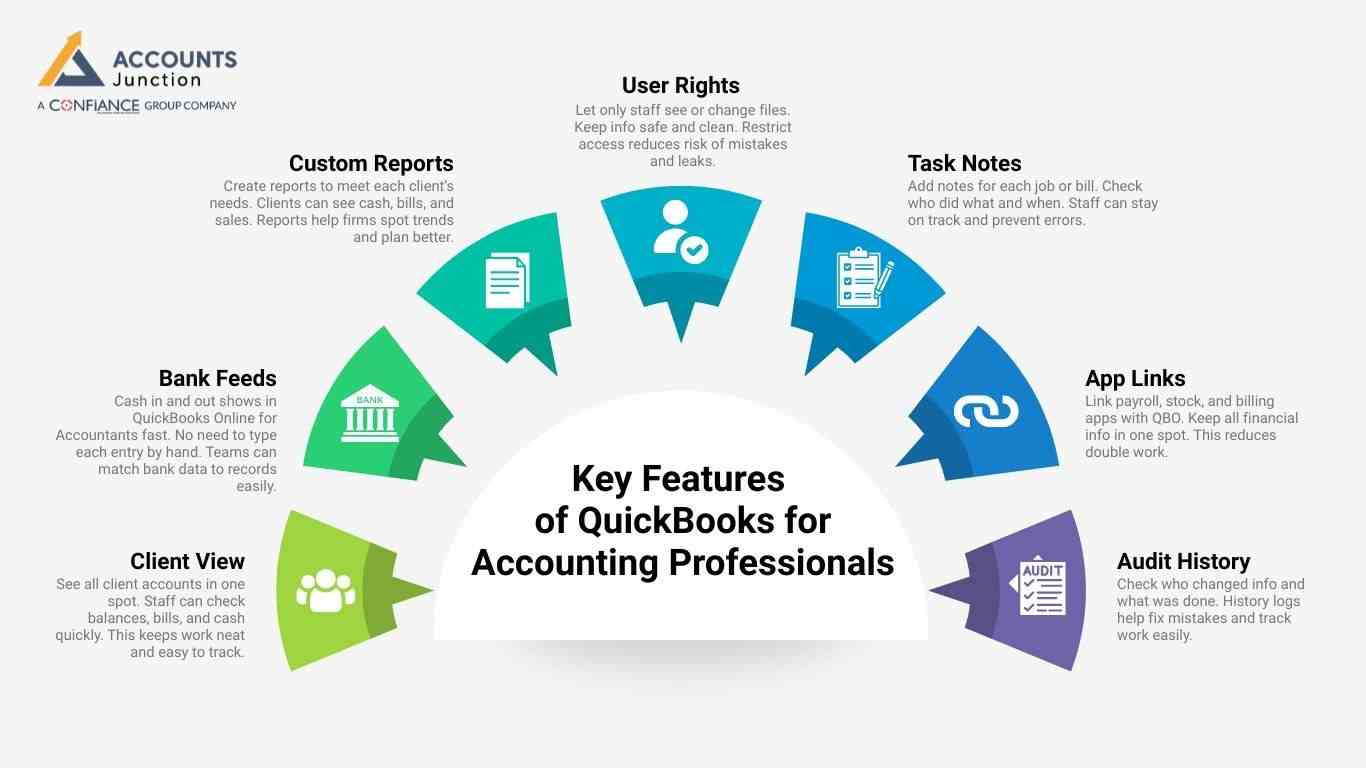
Key Features of QuickBooks for Accounting Professionals
-
Client View
See all client accounts in one spot. Staff can check balances, bills, and cash quickly. This keeps work neat and easy to track.
-
Bank Feeds
Cash in and out shows in QuickBooks Online for Accountants fast. No need to type each entry by hand. Teams can match bank data to records easily.
-
Custom Reports
Create reports to meet each client’s needs. Clients can see cash, bills, and sales. Reports help firms spot trends and plan better.
-
User Rights
Let only staff see or change files. Keep info safe and clean. Restrict access reduces risk of mistakes and leaks.
-
Task Notes
Add notes for each job or bill. Check who did what and when. Staff can stay on track and prevent errors.
-
App Links
Link payroll, stock, and billing apps with QBO. Keep all financial info in one spot. This reduces double work.
-
Audit History
Check who changed info and what was done. History logs help fix mistakes and track work easily.
Best Practices for Using QBO for Accountants
-
Setup Right
Check client name, tax ID, and cash start date. Use same style for accounts and bills. Proper setup avoids errors later. Staff should verify details before adding to QBO.
-
Check Bank
Look at bank feeds each week or month. Match cash in and cash out fast. Check flagged transactions to prevent mismatches. This keeps books true.
-
Use Same Names
Use the same words for accounts, bills, and clients. This stops mix-ups and keeps books clear. Consistency in naming helps in reports and tracking.
-
Track Bills
Ask clients to send bills on time. Add them to QBO fast and sort well. Categorize each bill to match the right account. Proper tracking avoids missed payments.
-
Use Auto Tools
Set repeat invoices and auto-categorize bills in QBO for Accountants. Alerts notify of unusual cash moves. Automation cuts manual work and saves time. Staff can focus on checks and planning.
-
Look at Reports
Check cash, bills, and sales each month. Spot errors fast and fix them soon. Compare budgets with real spend to stay in control. Reports help plan for growth and track progress.
-
Use QBO Tools
Use trial balance, client view, and write-offs in QuickBooks for accounting professionals. These help staff find and fix mistakes. Tools make monthly closing faster and more accurate.
Advanced Tips for QBO for Accountants
-
Manage Clients
Sort clients by size or date. Use folders and tags to find files fast. Prioritize urgent work to meet deadlines. Keep notes for each client to stay organized.
-
Task Checkpoints
Split work into small steps. Check each step before moving on. Staff can track progress easily. Checkpoints help avoid errors and keep deadlines.
-
Avoid Errors
Check client info before adding to QBO. Look at bank feeds and reports. Verify bills and invoices match records. Errors are easier to fix early.
-
Smart Add-ons
Link payroll, stock, and time apps using QuickBooks for Accounting Professionals. Cut manual work and stop mistakes. Add-ons save time and reduce repetitive tasks. Staff can track hours, pay, and stock more efficiently.
Streamlining Client Collaboration in QuickBooks Online
-
Share Reports
Give clients monthly cash, sales, and bill reports via QBO for Accountants. Discuss key numbers and trends. Clients can make smart decisions faster.
-
Use QBO Tools
Clients can log in to check files safely. No need to send email copies. Collaboration tools reduce delays and keep work smooth.
-
Set Deadlines
Ask for bills and receipts on time. Early papers keep books neat and true. Deadlines help staff stay organized and reduce errors.
Essential Security Practices for QuickBooks Online Accountants
-
Two-Step Login
Use login codes and passwords. This keeps hackers out and data safe. Staff should never share login details.
-
Limit Access
Only staff who need info can see it. Restricting access prevents errors and leaks. Sensitive data stays safe from misuse.
-
Back Up Data
Copy all files to cloud or drive. Keep safe copies in case of loss. Regular backups prevent loss of important client records.
Benefits of QuickBooks Online for Accountants
-
Save Time
Auto tasks cut hours of work. Staff can focus on checks, advice, and growth. Less manual work improves productivity and accuracy.
-
Fewer Mistakes
QBO flags cash or bill errors fast. Staff can fix issues quickly. Accurate books build client trust and confidence.
-
Clear Reports
Clients see cash, sales, and bills in one view. Reports are easy to read and use. Staff can create reports fast for each client.
-
Audit Ready
All past work is easy to check. Teams can give info fast during audits. This saves time and reduces stress.
-
Grow Clients
Handle more clients with same staff. QBO helps scale work fast and accurately. Firms can take more clients without more staff.
Linking QuickBooks Online for Accountants with Other Tools
Why Linking Matters
Linking QuickBooks Online for accountants with apps saves work. It also cuts mistakes and shows reports clearly. Firms can move data to stop repeated entries. This makes client work much easier and more neat.
Tools to Link
- Payment Apps
Connect PayPal or Stripe for easy tracking in QuickBooks Online for Accountants. This updates client payments fast without manual work.
- Stock Apps
Link inventory apps to update stock each day. This stops errors when sales and stock change.
- Time Apps
Track hours for correct client billing each month. Staff can make right invoices every time.
- Payroll Apps
Link payroll to pay staff correctly each week. This keeps staff records right and simple.
Best Ways to Link
Link only apps that are used most days. Test data first before using real client files. Check links often to stop mistakes or missing data.
Tips for Multi-Client Accounting in QBO
-
Sort Clients by Priority
Sort clients by date, size, or need each week in QuickBooks Online for Accountants. Staff can handle many accounts right and without stress.
-
Set Standard Work Steps
Use the same steps for all clients each month. Staff does work the same way and cuts mistakes.
-
Batch Work
Use batch invoices or batch payments each day. This cuts repeated work for many clients at once.
-
Check Progress
Check each client’s work every week without fail. Use QBO notes and dash to see progress.
Effective Training Strategies for QuickBooks Online for Accountants
Why Training Helps
Good training cuts mistakes and gives staff more skill. Teams can use QBO for accountants the right way.
Training Ways
- Online Guides
Short guides for tasks and reports online. Staff can learn fast at their own speed.
- Hands Practice
Test entries in a safe area first. Staff can gain skill without breaking real files.
- Workshops
Short meetings for tips, updates, and new features. Everyone learns the best steps for work.
Keep Learning
Tell staff about new QBO features often. Learning helps staff work fast and right every day.
Using QuickBooks Online for Accountants to Streamline Tax Work
-
Why It Helps Taxes
Using QuickBooks for accounting professionals keeps books neat for taxes. Clean books, cut mistakes and save work time.
-
Tips for Tax Time
Keep bills and receipts in order each month. Check accounts often to stop mistakes at the last minute. Make reports to show income, bills, and costs. This helps filing go faster and smoothly.
-
Client Benefits
Clients get tax done faster with less mistakes. Staff can give advice on deductions and rules.
Common QuickBooks Online Errors Accountants Should Avoid
-
Double Entries
Entering the same transaction twice makes wrong reports fast. Always check past entries before adding new ones.
-
Wrong Accounts
Put bills or income in right accounts each time. Use the same accounts for all clients to avoid errors.
-
Missed Bank Checks
Not checking the bank makes balances go wrong fast. Do weekly or monthly checks to stop mistakes.
-
Skip Updates
Not updating software can cause errors or missing tools. Check QBO updates often to keep work smooth.
Enhancing Client Communication with QuickBooks Online for Accountants
-
Share Money Snapshots
Send monthly snapshots of cash, bills, and profit using QuickBooks Online for Accountants. Clients can see trends fast and take action.
-
Clear Reports
Make easy-to-read reports without hard accounting words. Staff makes sure clients see data right and clear.
-
Regular Calls
Call clients short each month to share updates. This helps trust grow and cuts confusion over work.
Why QuickBooks Online for Accountants Is Ideal for Small Businesses
-
Why It Fits SMBs
Small firms may not have full accounting staff. QBO for accountants gives tools without extra hires.
-
Scale Faster With QB
As your business grows, QBO powers effortless scaling by handling more clients with speed and accuracy. Your team manages more accounts smoothly without expanding headcount.
-
Cheap Accounting
Using QuickBooks for accounting professionals cuts the need for many apps. One app tracks cash, bills, payroll, and invoices.
Using QuickBooks Online for accountants makes books neat, true, and easy to track. Following tips helps staff cut mistakes and save time. Firms using QBO for accountants can track clients, cash, bills, and sales clearly. Auto tasks, checks, and safe access make work fast. Staff can focus on advice and growth.
At Accounts Junction, we help accounting firms use QuickBooks Online for accounting professionals with confidence and ease. From account setup and staff training to cash flow checks and error fixes, our team supports accurate, well-organized books. We also prepare clear reports and maintain audit-ready records, helping firms manage more clients without adding extra staff. With dependable support in place, teams can focus on long-term growth while QuickBooks stays simple, secure, and efficient. If you want to explore smarter ways to streamline QBO workflows, Accounts Junction is here to help.
FAQs
1. How do accountants set up QuickBooks Online for clients?
- Use client details, chart of accounts, and fiscal year settings.
2. What are the best practices for QBO for accountants?
- Reconcile accounts, track expenses, use automation, and review reports.
3. How can QBO improve bookkeeping accuracy for accountants?
- Auto bank feeds, task notes, and error alerts reduce mistakes.
4. Which tools in QBO help accounting professionals manage clients?
- Client dashboard, trial balance, write-offs, and custom reports assist daily.
5. How can accountants secure QuickBooks Online accounts effectively?
- Two-step login, user access control, and regular data backups.