

How to Choose the Best Financial Software for Your Business?
Running a business needs proper financial control. Without it, your business may face losses or confusion. Choosing the best financial software helps manage all money tasks easily. This includes tracking income, expenses, and creating reports.
There are many software tools on the market. But picking the right one can be hard. In this guide, we will help you select the best financial software that fits your needs.
Why Financial Software Is Important
Financial software makes money management easy. It helps you keep records, generate reports, and save time. You no longer need to manage everything manually. This reduces errors.
It also helps with:
- Budget planning
- Invoicing
- Tax calculation
- Expense tracking
- Payroll management
The best financial tracking software ensures all tasks are completed efficiently. You get a clear view of your money anytime.
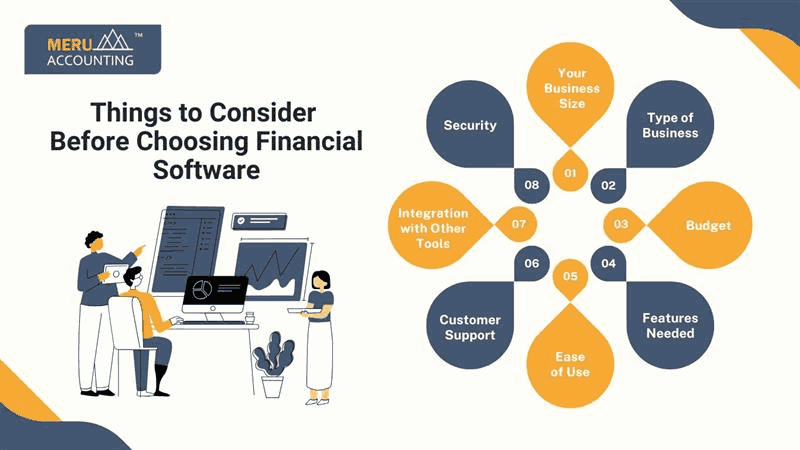
Things to Consider Before Choosing the Best Financial Software
Before you buy any software, consider these points:
1. Your Business Size
- Small businesses may not need complex software. Big companies may need more features. Choose as per your business size.
2. Type of Business
- A retail store and a service business need different features. Pick one that matches your type of work.
3. Budget
- Software comes in many price ranges. Some are free with limited features. Some are paid with full tools. Always check your budget first.
4. Features Needed
Make a list of what you want. Some features may include:
- Billing and invoicing
- Cash flow tracking
- Profit and loss reporting
- Inventory management
You should select the best financial tracking software that has the above features.
5. Ease of Use
- The software should be easy to use. You should not need a tech expert. A clean dashboard and simple menu are good signs.
6. Customer Support
- You may need help with software setup or bugs. Good support matters. Choose one with 24/7 support or at least a fast response.
7. Integration with Other Tools
- The software must work well with your bank, payroll tools, and CRM. It saves time and avoids data entry.
8. Security
- You will store financial data in the software. Make sure it has good security, like encryption and backup.
Top Features to Look For
The best financial software should offer key features to help you grow your business. Here are some of them:
1. Automated Bookkeeping
- This saves time and reduces errors. Your daily transactions are recorded without manual entry.
2. Real-Time Reporting
- Get reports at any time. Know your profit, loss, and cash flow in real-time.
3. Tax Calculation
- It should help you calculate taxes and even file returns. This avoids late fees or mistakes.
4. Multi-User Access
- If your business has a team, go for software that allows access to multiple users. Set roles for each user to protect data.
5. Mobile Access
- The best business financial software allows mobile access. You can check reports or send invoices anytime.
Benefits of Using the Best Financial Software
Using the right software helps in many ways:
- Saves Time: No need for manual entries. Everything is automated.
- Avoids Errors: Fewer human error means better records.
- Better Decisions: You can quickly view your financial data at any time.
- Improved Cash Flow: Know when to collect and pay.
- Easy Tax Filing: Auto reports make tax time simple.
The best financial software also gives alerts on due bills, low stock, or budget limits.
Top 5 Popular Financial Software for Businesses
Here are some good software options you can explore:
1. QuickBooks
- Ideal for small to medium businesses. It is easy to use and has many features.
2. Xero
- Good for businesses needing a simple UI. Cloud-based with strong reporting.
3. Zoho Books
- Affordable and feature-rich. Suitable for growing businesses.
4. FreshBooks
- Best for freelancers and service providers. Easy invoicing and tracking.
5. Wave
- Free option for very small businesses. Basic features with good value.
These are examples of the best financial software options in the market.
Mistakes to Avoid While Choosing Financial Software
Selecting the right software can save time, but one wrong choice might cause unnecessary stress later. Many business owners rush into buying tools without proper research. Here are some common mistakes you should try to avoid when choosing financial software.
1. Assuming Expensive Means Better
Just because a tool costs more doesn’t automatically make it the best fit.
Sometimes, a simple and affordable software can do everything your business needs — without draining your budget.
2. Choosing Software with Too Many Features
More features aren’t always useful.
If your business is small, an overloaded system may confuse your team and slow down your workflow.
3. Ignoring Customer Reviews
Skipping reviews means missing real user experiences.
Before purchasing, read what other businesses say about reliability, ease of use, and customer service.
4. Skipping the Free Trial
A free trial helps you explore the software in real conditions.
It’s the best way to check whether the system matches your expectations before paying for it.
5. Overlooking Update and Support Policies
Support and updates keep your system safe and functional.
Always check how often updates are released and how quickly the provider responds to user issues.
6. Not Considering Integration Needs
Some tools may not connect well with your banking or payroll systems.
Ensure compatibility before purchase to prevent future headaches.
7. Forgetting About Scalability
A tool that fits you now may not fit you later.
Make sure your software allows upgrades or add-ons as your business grows.
How to Start Using the Chosen Financial Software
Once you’ve selected the right financial software, it’s time to set it up properly.
This process can be simple if you follow a clear, step-by-step approach.
Step 1: Choose and Purchase
Select the version that fits your business type and budget.
Review plan features before confirming your purchase.
Step 2: Setup and Install
Most software tools allow you to install locally or sign up online for a cloud version.
Follow the guided setup instructions to complete installation.
Step 3: Connect Your Bank Accounts
Link your business bank accounts and credit cards.
This connection allows automatic import of transactions and easier cash flow tracking.
Step 4: Add Key Data
Enter customer details, supplier information, and product or service lists.
Accurate data setup ensures your reports and invoices remain correct from the start.
Step 5: Begin Tracking Transactions
Start recording expenses, sending invoices, and generating reports.
You can now see your finances in one place and manage them like a professional.
Step 6: Test and Adjust
Explore different features to see how they work.
You can adjust settings, permissions, or layouts based on what suits your daily routine.
Strategies to Maximize the Benefits of Financial Software
Owning financial software is one thing, but using it effectively can take your business performance to another level.
The following strategies can help you make the most of your financial management tools.
1. Use It Regularly
Open the software daily or weekly to stay updated.
Consistent use keeps your data current and reduces errors.
2. Set Smart Alerts
Activate notifications for due payments or low balances.
These alerts help you maintain cash flow and avoid late fees.
3. Reconcile Bank Statements Monthly
Always match your records with bank statements.
Regular reconciliation ensures accuracy and prevents future confusion.
4. Seek Expert Guidance When Needed
Even the best tools can’t replace professional advice.
An accountant or bookkeeper can help fine-tune your reports and ensure compliance.
5. Keep Software Updated
Updates not only improve features but also strengthen security.
Enable automatic updates or check regularly for new versions.
6. Analyze Reports Periodically
Review your financial reports often to spot trends or risks.
These insights can guide smarter business decisions over time.
7. Backup and Secure Your Data
If you’re using offline software, schedule regular backups.
For cloud systems, verify that automatic backups are active.
How Cloud Technology Enhances Financial Software
Cloud-based financial tools can transform the way businesses handle money. With data stored online, everything becomes faster, safer, and more flexible. Updates happen in real time, and access is no longer tied to one computer or location.
1. Easy Access from Anywhere
Cloud technology allows you to log in from any device — whether you’re in the office, visiting a client, or working remotely.
This flexibility helps business owners stay connected to their finances at all times.
2. Real-Time Collaboration
Multiple users can view and edit financial data simultaneously.
Team members can work together on budgets, reports, or invoices without sending endless files back and forth.
3. Built-In Data Backup
Most cloud-based financial software includes automatic data backups.
Even if your computer fails or files are lost locally, your financial records remain secure online.
4. Enhanced Security Measures
Cloud systems usually come with high-level encryption and access control features.
Only authorized users can access sensitive data, reducing the risk of breaches or unauthorized activity.
5. Seamless Updates
Software updates happen automatically in the background.
You always have the latest features and security patches without manual installation.
Customization and Scalability in Financial Software
No two businesses are identical — and neither should their financial systems be. Customization and scalability ensure your software adapts as your business evolves.
1. Flexibility to Grow
Good financial software lets you start with basic tools and add more features later.
Whether your company expands to new markets or hires more staff, the system can grow with you.
2. Customizable Dashboards
Some software allows you to design your own dashboard layout.
You can highlight key figures like cash flow, expenses, or sales performance for instant visibility.
3. Industry-Specific Modules
Look for software that supports add-ons or modules for your business type.
For example, a retail firm might need inventory tracking, while a service company may prefer time-tracking tools.
4. Personalized Reports and Templates
You can often create custom reports, invoice formats, and tax summaries.
This helps present financial data in a way that matches your brand identity and operational needs.
5. Smooth Integration with Other Tools
The best financial software can integrate with CRMs, payroll apps, or eCommerce platforms.
Such integration eliminates double data entry and keeps everything in sync.
6. Long-Term Cost Efficiency
When your software scales with your business, you avoid switching systems later.
This reduces migration costs and minimizes learning curves for your team.
Common Challenges Businesses Face While Using Financial Software
Even the best software may present challenges, especially during the early stages of use. Understanding these issues helps you plan better and avoid common mistakes.
1. Learning Curve for New Users
If you or your team are new to accounting systems, the initial setup can feel confusing.
Basic training or guided tutorials can make the process smoother.
2. Integration Difficulties
Sometimes data may not sync properly between platforms.
Ensuring compatibility and connecting through verified APIs can prevent such issues.
3. Internet Dependency
Cloud-based tools need stable internet access.
A poor connection may delay updates or slow performance.
4. Subscription and Cost Concerns
Monthly or yearly subscription plans can become expensive over time.
It’s smart to compare pricing tiers and ensure the plan matches your actual needs.
5. Data Migration Issues
Transferring data from old systems can sometimes lead to mismatched entries or missing files.
Running small test imports before full migration can help catch problems early.
6. Security Mismanagement
Even secure software can face risks if passwords are weak or user access is mismanaged.
Setting up user roles and enforcing strong passwords can minimize these threats.
7. Lack of Consistent Usage
Software is only as effective as the consistency of its use.
Regularly updating data and reviewing reports ensures the system reflects true financial health.
Choosing the best financial software takes time. But it is worth it. Good software helps you grow and manage your business. Always pick software that fits your needs, is easy to use, and gives real value.
The best business financial software can transform the way you manage your finances. With the right tool, you stay organized and stress-free. Choose wisely, and you’ll be set for success.
Remember, the best financial software is not just about cost. It's about ease, support, and features that matter to your business.
FAQs
1. What does the best financial software do for a business?
- It helps manage all money-related tasks like budgeting, invoicing, and cash flow tracking in one easy system.
2. How can the best financial software improve daily business operations?
- It automates tasks, reduces manual work, and gives a clear view of business finances in real time.
3. Why is choosing the best financial software important?
- Because the right software can save time, prevent errors, and support better financial decisions.
4. Can the best financial software replace hiring an accountant?
- Not completely, but it can simplify accounting work and reduce how often you need expert help.
5. Is the best financial software suitable for small businesses?
- Yes, many affordable options like QuickBooks or Zoho Books fit small and growing companies.
6. How secure is cloud-based financial software?
- The best financial software uses encryption and secure servers to protect sensitive business data.
7. Does the best financial software integrate with banking or payroll tools?
- Yes, most systems allow easy integration with banks, payroll, and CRM tools for smooth operations.
8. How do I know which financial software is best for my business?
- Compare features, check user reviews, and always test a free trial before final purchase.
9. What features should I look for in the best financial software?
- Look for automation, reporting, tax calculation, and multi-user access to ensure flexibility.
10. How often should I update my financial software?
- Always install updates or patches when released to keep your system secure and efficient.
11. Can I access the best financial software on mobile?
- Yes, most modern financial tools include mobile apps for on-the-go tracking and reporting.
12. Does the best financial software support multiple currencies?
- Yes, advanced software supports international transactions for global businesses.
13. Can financial software handle both income and expenses?
- Yes, it records earnings and spending so you can clearly see profit margins.
14. How can the best financial software help with tax filing?
- It creates accurate tax-ready reports and may even assist in calculating taxes automatically.
15. What are common mistakes when choosing financial software?
- Picking expensive or over-complicated tools without testing them first is a frequent mistake.
16. Can multiple users work in the same financial software system?
- Yes, many platforms allow role-based access for teams and accountants.
17. What happens if my data gets lost or corrupted?
- Cloud-based software automatically backs up your financial data on secure servers.
18. How long does it take to set up the best financial software?
- Setup can take a few hours to a couple of days depending on data volume and customization.
19. Is there free financial software for startups?
- Yes, Wave and Zoho Books are popular free or low-cost options ideal for new businesses.
20. How does the best financial software support business growth?
- It scales with your operations, provides deeper insights, and helps maintain financial control as you expand.