
What is Finance and Accounting Automation and Outsourcing?
In the modern business environment, businesses are constantly seeking ways to improve efficiency, reduce costs, and streamline operations. One of the most transformative advancements in finance is accounting automation. As technology continues to evolve, traditional bookkeeping and accounting tasks are being automated to minimize errors and improve accuracy. Accounting and automation go hand in hand, offering businesses faster financial processing, better compliance, and enhanced data security. Whether you're a small business or a large corporation, leveraging accounting automation can be a game-changer for financial management.
What is Automation in the Accounting Industry?
1. Definition and Purpose
- Automation in the accounting industry involves leveraging software, artificial intelligence (AI), and machine learning to streamline financial processes.
- It aims to reduce manual efforts, eliminate errors, and increase productivity in bookkeeping and financial reporting.
2. Key Technologies Used in Accounting Automation
- Cloud-based Accounting Software – Platforms like QuickBooks, Xero, and FreshBooks provide automated accounting features.
- AI and Machine Learning – Helps in fraud detection, expense categorization, and financial forecasting.
- Optical Character Recognition (OCR) – Converts scanned receipts and invoices into digital data.
- Robotic Process Automation (RPA) – Automates data entry, bank reconciliations, and invoice processing.
3. Automating Bookkeeping and Financial Tasks
- Data Entry Automation – Eliminates manual input by syncing financial data from bank feeds and invoices.
- Invoice and Billing Automation – Generates invoices, tracks payments, and sends automated payment reminders.
- Bank Reconciliation – Matches transactions automatically to identify discrepancies.
- Payroll processing involves the automated calculation of wages, withholding of taxes, and adherence to labor regulations.
4. Reducing Human Errors and Improving Accuracy
- Automation reduces common bookkeeping errors like duplicate entries, missing transactions, and calculation mistakes.
- AI-powered tools identify inconsistencies and suggest corrective actions.
5. Compliance and Taxation Efficiency
- Ensures businesses comply with tax regulations by automating tax calculations and filings.
- Keeps records updated for audits, reducing compliance risks.
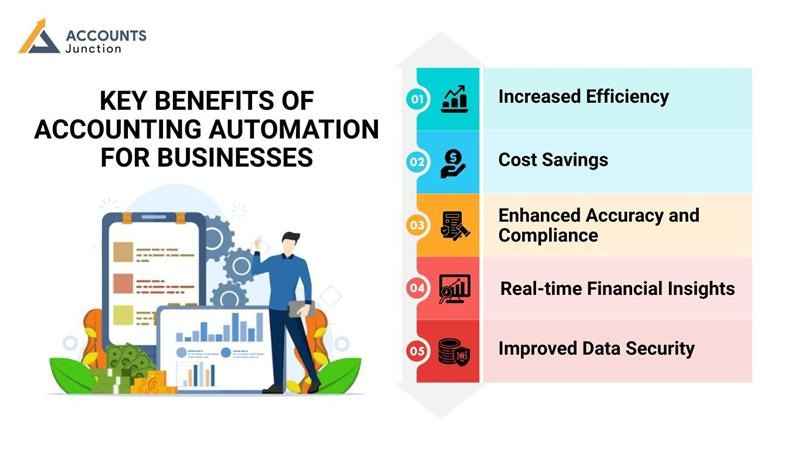
Key Benefits of Accounting Automation for Businesses
Implementing accounting automation provides numerous benefits, allowing businesses to focus on growth rather than spending time on manual bookkeeping. The primary advantages are:
1. Increased Efficiency
Automation reduces the time spent on repetitive tasks, such as invoice processing, reconciliations, and payroll management. This allows accounting professionals to focus on strategic decision-making.
2. Cost Savings
By adopting automation in the accounting industry, companies can minimize labor costs while maximizing efficiency. Automated processes require fewer resources, saving money on administrative expenses.
3. Enhanced Accuracy and Compliance
Human errors in accounting can lead to significant financial losses. Accounting automation minimizes these risks by ensuring precise calculations, automatic tax filings, and accurate financial reporting.
4. Real-time Financial Insights
With automated systems, businesses can generate real-time reports on cash flow, expenses, and profitability. This enables better financial planning and decision-making.
5. Improved Data Security
Financial data is sensitive and requires stringent security measures. Automation accounting systems come with advanced encryption and access control features, reducing the risk of fraud or unauthorized access.
The Role of Technology in Accounting and Automation
The integration of technology in accounting and automation has revolutionized financial management. Here are some of the most significant technological advancements:
1. Cloud Accounting
Cloud-based accounting platforms enable businesses to access financial data anytime, anywhere. This is especially beneficial for accounting outsourcing, where accountants work remotely while ensuring data integrity.
2. Artificial Intelligence (AI) and Machine Learning
AI-powered automation accounting tools can predict financial trends, detect fraud, and streamline tax compliance. Machine learning algorithms continuously improve their accuracy over time.
3. Robotic Process Automation (RPA)
RPA automates repetitive tasks, such as invoice processing and bank reconciliations, without requiring human intervention.
4. Blockchain Technology
Blockchain enhances transparency and security in financial transactions, making it an integral part of modern accounting automation systems.
5. Integration with Enterprise Resource Planning (ERP)
Accounting software is increasingly being integrated with ERP systems, allowing seamless management of financial, operational, and business activities.
Which Accounting Outsourcing Service Best Fits Your Business?
Outsourcing accounting functions has become a popular choice for businesses looking to optimize their financial processes. Yet, the selection of a suitable accounting outsourcing partner remains essential. Here’s what to consider:
1. Expertise in Automation Accounting
Look for a service provider with experience in automation in the accounting industry. They should have a strong track record in implementing AI-driven financial solutions.
2. Security and Compliance
Ensure that the outsourcing firm follows strict data security protocols and complies with industry regulations, such as GDPR and financial reporting standards.
3. Scalability
Your accounting outsourcing partner should be able to scale services as your business grows. They should offer flexible solutions that cater to businesses of all sizes.
4. Cost-effectiveness
Evaluate the pricing structure of the outsourcing service provider. The cost of outsourcing should be lower than maintaining an in-house accounting team.
5. Technology Integration
Choose a partner who can seamlessly integrate their automation accounting solutions with your existing accounting software or ERP system.
Common Challenges in Accounting Automation and Outsourcing
Even with automation, businesses can face some problems. Knowing them helps you plan better.
- Resistance to Change: Staff may stick to old ways and avoid new systems.
- Integration Issues: New software may not work well with old systems or tools.
- Data Privacy Concerns: Cloud storage can be risky if security is weak.
- Dependence on Technology: Relying too much can cause problems if systems fail.
- Skill Gap: Employees may need training to use automation tools well.
How Businesses Can Move to Accounting Automation
Switching from manual accounting to automated systems can feel hard. Here is a simple way to do it:
- Check Current Work: Find repetitive tasks and areas where mistakes happen.
- Pick the Right Software: Choose tools that fit your business size and needs.
- Test First: Try the software with a small part of your work to see how it works.
- Train Staff: Make sure employees know how to use the tools.
- Move Step by Step: Don’t change everything at once.
- Review and Improve: Check results, fix problems, and make processes better.
Future Trends in Accounting Automation
Accounting automation is growing fast. Here are some trends to watch:
- Smart AI Predictions: Tools may forecast cash flow and spending.
- Custom Dashboards: Reports can show info based on role or department.
- Voice Commands: You may use voice to check reports or approve bills.
- Blockchain Use: Helps prevent fraud and keeps records clear.
- Global Remote Teams: More businesses may hire skilled workers worldwide to save costs.
Incorporating automation accounting into business operations is no longer optional—it is essential for maintaining efficiency, accuracy, and compliance. As technology continues to advance, businesses must embrace automation in the accounting industry to stay competitive. If you're looking for reliable accounting outsourcing and accounting automation solutions, Accounts Junction is here to help. Contact us today to streamline your financial processes and take your business to the next level.
Accounts Junction helps businesses simplify their accounting with easy-to-use automation and outsourcing services. We use modern tools to handle bookkeeping, reports, and taxes, cutting down manual work and saving time. Our team of skilled accountants makes sure all work is correct and follows the rules. Your data is safe with our secure cloud systems.
Our outsourcing services also save money by giving businesses expert support without hiring full-time staff. We offer help any time and show real-time reports, so you always know your finances. With Accounts Junction, you can focus on growing your business while we manage the numbers.
FAQs
1. What is finance and accounting automation?
- It means using tools or software to handle books, payroll, bills, and reports with less hand work.
2. How can automation help business accounting?
- It can cut mistakes, save time, and give quick updates to help make faster choices.
3. What tasks can be automated in accounting?
- Data entry, invoice handling, bank checks, payroll, and tax work can be done by software.
4. Why should businesses hire outside accounting help?
- Outsourcing gives expert support, uses smart tools, and can lower costs.
5. Can automation help with taxes?
- Yes, it can do tax counts, make reports, and help fill tax forms correctly.
6. What does AI do in accounting automation?
- It can sort expenses, spot fraud, predict trends, and help make reports right.
7. Is outsourced accounting safe?
- Good providers use strong locks, password rules, and secure cloud storage to keep data safe.
8. What is robotic process automation in accounting?
- RPA uses bots to do repeat jobs like posting bills, checking accounts, and handling payroll.
9. Which tasks gain most from automation?
- Bills, payroll, bank checks, and reports often see the most help from software.
10. How does cloud accounting help automation?
- It lets accountants work from anywhere and keeps all data up to date automatically.
11. Can automation lower human mistakes?
- Yes, it cuts repeated entries, missed items, and wrong sums.
12. How can small businesses use accounting automation?
- Start with automatic invoices, bank links, and payroll tools, then grow to full automation.
13. Is automation fit for all businesses?
- Most firms, from small shops to big firms, can gain if they have enough transactions.
14. What problems come with accounting automation?
- It can be hard to connect with old systems, need staff training, and cost more at first.
15. How does automation help reports?
- It gives real-time, exact reports showing cash, profits, and spending.
16. Can outsourced accounting grow with my business?
- Yes, outside teams can add services and tools as business needs rise.
17. What is OCR in finance automation?
- OCR reads bills, receipts, and paper forms and turns them into digital data.
18. How does automation help decisions in finance?
- By giving quick updates and trend info, it helps managers choose wisely.
19. Which tools are used in accounting automation?
- AI, smart learning, bots, OCR, cloud tools, and ERP links are used often.
20. Why choose Accounts Junction for automation and outsourcing?
- We use smart tools, safe cloud storage, and skilled teams to make accounting easy.