
Virtual Bookkeeping Services Vs. In House Comparison
Keeping track of money may seem simple, but it can shape how a business runs and grows. Recording money in and out may seem small, yet it can show trends, problems, and chances that affect the future of a company. Over time, business owners may ask: should they hire someone in the office to handle accounts, or use someone who works from a distance? This brings us to the topic of virtual bookkeeping Vs. in-house bookkeeping. The choice can affect daily work and speed. In-house bookkeeping may feel more hands-on and close, while virtual bookkeeping may give more choice and save money.
Depending on the size, cash flow, and tasks of a business, one way may feel right. Let’s look at both ways in detail to see the pros, cons, and times when each may work best.
What Is In-House Bookkeeping?
In-house bookkeeping means hiring staff to work inside your office. These people handle bills, payroll, bank checks, costs, and reports. They may work close to the boss, watch daily work, and answer questions fast.
-
Watch Work Up Close
When a bookkeeper is in the office, it is easy to check work. Mistakes may be seen fast and fixed before they grow. For example, if a staff member writes down a cost twice, you may see it at once rather than find it weeks later.
-
Learn the Business
An in-house bookkeeper may know the daily habits and main tasks of the company. They may notice trends, such as repeated bills or sales shifts, that someone outside may not see. For example, a bookkeeper who sees weekly stock delivery may spot cost changes that hint at vendor issues.
-
Easy Access to Paperwork
In discussions of virtual bookkeeping Vs. in-house bookkeeping, physical access to documents gives in-house teams a speed advantage for audits.
-
Costs to Consider
Hiring full-time staff may need pay, perks, desk space, and training. Small firms may find this heavy. Even if hiring seems doable, extra costs like bonuses, health cover, or overtime can add up.
What Is Virtual Bookkeeping?
Virtual bookkeeping uses online tools and remote staff. Work is done from a distance using the internet. Businesses upload receipts, bills, and bank info, and remote bookkeepers handle tasks online.
-
Work When It Fits
Virtual bookkeepers may work across zones or hours. This may help firms get updates without being tied to office time. For example, a company in India may hire a virtual bookkeeper in the US or Philippines, getting reports at the start of each day before office work begins.
-
Costs Are Lower
No need for full-time staff or office space may cut costs. Companies often pay for tasks or a monthly fee, which may fit small firms well.
-
Use of Tools
Virtual bookkeepers often use online software to do work faster and cut mistakes. Some tools may match bank statements with bills, saving hours of work.
-
Some Gaps in Talk
Since virtual bookkeepers are remote, replies may take time. Clear directions and check-ins are needed to avoid mix-ups. A small mistake about a bill can cause late payments or errors. Good chat, mail, or call tools may help.
Comparing Virtual Bookkeeping Vs. In-House Bookkeeping
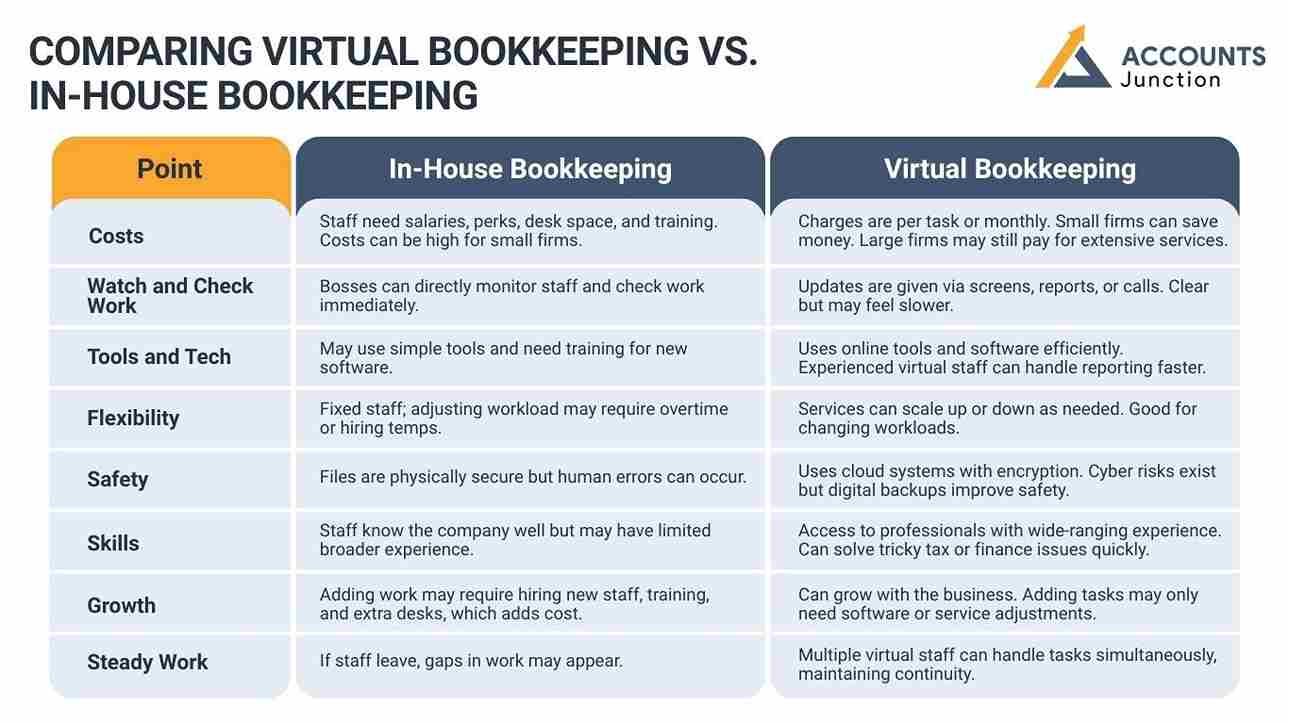
To pick between virtual bookkeeping Vs. in-house bookkeeping, some points may help. Each has strong points and weak points. Knowing them may help a business choose.
|
Point |
In-House Bookkeeping |
Virtual Bookkeeping |
|
1. Costs |
Staff need salaries, perks, desk space, and training. Costs can be high for small firms. |
Charges are per task or monthly. Small firms can save money. Large firms may still pay for extensive services. |
|
2. Watch and Check Work |
Bosses can directly monitor staff and check work immediately. |
Updates are given via screens, reports, or calls. Clear but may feel slower. |
|
3. Tools and Tech |
May use simple tools and need training for new software. |
Uses online tools and software efficiently. Experienced virtual staff can handle reporting faster. |
|
4. Flexibility |
Fixed staff; adjusting workload may require overtime or hiring temps. |
Services can scale up or down as needed. Good for changing workloads. |
|
5. Safety |
Files are physically secure but human errors can occur. |
Uses cloud systems with encryption. Cyber risks exist but digital backups improve safety. |
|
6. Skills |
Staff know the company well but may have limited broader experience. |
Access to professionals with wide-ranging experience. Can solve tricky tax or finance issues quickly. |
|
7. Growth |
Adding work may require hiring new staff, training, and extra desks, which adds cost. |
Can grow with the business. Adding tasks may only need software or service adjustments. |
|
8. Steady Work |
If staff leave, gaps in work may appear. |
Multiple virtual staff can handle tasks simultaneously, maintaining continuity. |
When In-House Bookkeeping is the best option
- When face-to-face talk is often needed
- When knowing internal culture is key
- For handling very sensitive info
- If money allows full-time pay and perks
When Virtual Bookkeeping is the best option
- Small firms that want to save cash
- Teams that are spread out
- Firms that want tools without extra training
- Businesses with seasonal or uneven workloads
Real Examples
Think of a small shop. The owner wants to focus on sales and stock, not daily books. Hiring in-house staff may cost too much. A virtual bookkeeper could track costs, balance accounts, and give monthly reports without needing office space or full-time pay.
Now think of a mid-size firm with many departments. In-house staff may spot odd costs or payroll errors faster than remote staff. They may talk to managers right away and work with other teams.
These examples show that the best choice may depend on firm size, tasks, and needs.
Combining In-House and Virtual Bookkeeping
Understanding virtual bookkeeping Vs. in-house bookkeeping helps firms decide which tasks stay in-house and which can be outsourced online.
Many businesses now use a mix of in-house and virtual bookkeeping. Key work stays inside the company, while daily tasks are done online. This helps firms stay in control and save time.
1. Keep Important Tasks In-House
- Core Work: Approving bills, making reports, and key decisions stay with the in-house team.
- Better Control: This keeps sensitive financial work in the company and allows close monitoring.
2. Outsource Daily Tasks
- Virtual Help: Data entry, daily bookkeeping, and basic report prep can be handled online.
- Ease Workload: Delegating these tasks reduces stress and keeps work accurate.
3. Balance the Team’s Workload
- Less Pressure: In-house staff can focus on planning and review while routine tasks are done online.
- Room to Grow: This setup allows a business to scale without hiring extra full-time staff.
4. Real-World Example
- How It Works: Looking at virtual bookkeeping Vs. in-house bookkeeping, a mix can be ideal: core approvals stay in-house, while virtual staff handle routine entries, keeping workflow smooth.
- Benefits: Work runs smoothly, errors drop, and resources are used well.
Tips to Pick the Right Way
Comparing virtual bookkeeping Vs. in-house bookkeeping can guide choices about costs, workload, tools, and growth.
- Look at Workload: Count daily, weekly, or monthly tasks.
- Check Budget: Compare pay, perks, and tools for in-house vs virtual fees.
- Think About Skills: Know if special tax or rule knowledge is needed.
- Check Comfort with Tools: If staff can use software well, virtual work may run smooth.
- Plan for Growth: When considering virtual bookkeeping Vs. in-house bookkeeping, planning for growth helps decide whether adding remote staff or in-house members is simpler.
Choosing between virtual bookkeeping Vs. in-house bookkeeping may depend on size, money, workflow, and comfort with tools. One is not always best. Some firms may gain from in-house watch and presence. Others may gain from flexibility and lower costs.
At Accounts Junction, firms may get help to pick the right way. Knowing your needs can make the choice easy. With the right setup, bookkeeping may feel less like work and more like a guide for smart decisions.
FAQs
1. Can virtual bookkeeping replace in-house staff?
- It may for small or remote firms, but big firms may still need in-house staff.
2. Is in-house bookkeeping safer?
- Not always. Physical presence may feel safe, but online tools can be secure.
3. Do virtual bookkeepers work in real time?
- They may, depending on software and chat methods.
4. Which is cheaper?
- Virtual work may cost less since no pay or perks are needed.
5. Can in-house staff use new software?
- Yes, but they may need training. Virtual staff may know it well.
6. Is virtual bookkeeping safe?
- Yes, if you pick a skilled service and good tools.
7. How fast is virtual work?
- Automation may cut time compared to manual work.
8. Can virtual bookkeeping work for big firms?
- Yes, if work rules are clear and software scales.
9. Do in-house staff know the firm better?
- Yes, they may see patterns over time more than remote staff.
10. Can virtual bookkeeping handle taxes?
- Yes, many services include filing and prep.
11. Is in-house flexible?
- It may not be, due to fixed hours and staff limits.
12. Are backups done online?
- Cloud systems often save automatic backups.
13. Are there risks with virtual work?
- Some delays or cyber threats exist but can be managed.
14. Can both ways be used?
- Yes, a mix can balance control and cost.
15. Can virtual work reduce mistakes?
- Yes, automation helps prevent errors.
16. Is hiring in-house long?
- Yes, recruiting and training may take weeks.
17. Can virtual work cross countries?
- Yes, for firms in many locations.
18. Which is best for new firms?
- Virtual work may save money and handle tasks well.
19. Is virtual work easy to grow?
- Yes, it can expand with the firm.
20. Can in-house handle sudden spikes?
- It may need extra staff, while virtual services can cope.