
Security Essential for Cloud-Based Accounting
Cloud-based accounting can make managing business finances faster and easier. It allows financial records to be stored online for access anytime. Companies may track income, send invoices, and create reports easily. Cloud tools may reduce mistakes and save time for employees.
However, storing financial data online may come with risks. Sensitive information, like client details or bank numbers, may be exposed. Security lapses may cause losses, breaches, or damage to reputation. Companies may need proper measures to keep cloud accounts safe.
Understanding Cloud-Based Accounting
Cloud-based accounting may store financial records on the internet. Users may access data anytime from computers or mobile devices.
Key Features
- It may help with billing, payroll, and tax tasks automatically. Companies may see financial reports in real-time with ease.
Benefits
- Cloud platforms may reduce errors and speed up work processes. This may also let teams collaborate and share information safely.
Possible Risks
- Storing data online may bring chances of hacking or loss. Accidents or weak security may expose sensitive company information.
Why Security Is Important for Cloud-Based Accounting
-
Protecting Sensitive Data
Financial files in cloud-based accounting may contain client names, accounts, and tax numbers. Exposing this data may lead to fraud or money loss.
-
Avoiding Money Loss
Security problems in cloud-based accounting may cost companies a lot of money. Businesses may need to spend extra resources to recover files.
-
Keeping Trust
Clients and investors may expect data to be safe always. Poor security may reduce trust and affect business chances.
-
Following Rules
Many industries have rules for keeping data safe. Cloud platforms may need a proper setup to meet these rules.
Common Security Threats in Cloud-Based Accounting
-
Data Breaches
Hackers may target cloud-based accounting data illegally.. This may expose sensitive data to competitors or criminals.
-
Insider Threats
Staff or contractors may accidentally share or misuse information. Companies may need rules to reduce risks from within.
-
Phishing Attacks
Fake emails may trick staff into giving login details. Attackers may pretend to be trusted sources to steal access.
-
Ransomware
Malware may lock files and ask for payment to unlock. Without backups, companies may lose important records forever.
-
Weak Login Systems
Simple passwords or single login steps may be unsafe. Strong checks may lower the chances of unauthorized access.
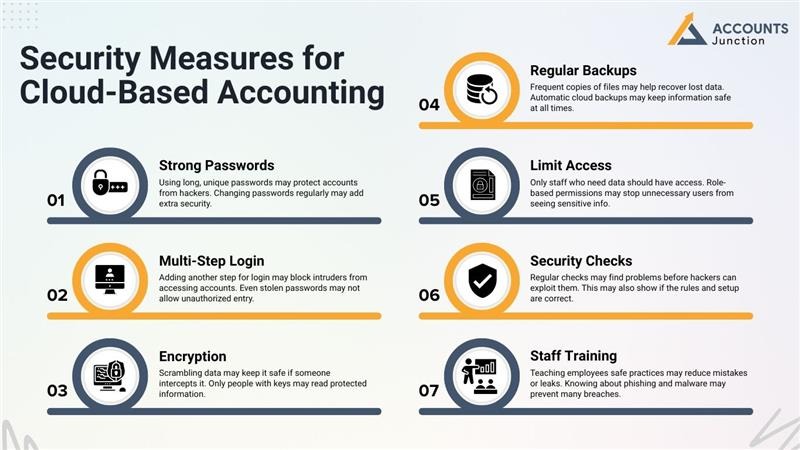
Security Measures for Cloud-Based Accounting
-
Strong Passwords
Using long, unique passwords may protect accounts from hackers. Changing passwords regularly may add extra security.
-
Multi-Step Login
Adding another step for login may block intruders from accessing accounts. Even stolen passwords may not allow unauthorized entry.
-
Encryption
Scrambling data may keep it safe if someone intercepts it. Only people with keys may read protected information.
-
Regular Backups
Frequent copies of files may help recover lost data. Automatic cloud backups may keep information safe at all times.
-
Limit Access
Only staff who need data should have access. Role-based permissions may stop unnecessary users from seeing sensitive info.
-
Security Checks
Regular checks may find problems before hackers can exploit them. This may also show if the rules and setup are correct.
-
Staff Training
Teaching employees safe practices may reduce mistakes or leaks. Knowing about phishing and malware may prevent many breaches.
Choosing the Right Cloud Accounting Provider
-
Follows Rules
Good providers follow strict rules to keep data safe. Meeting rules help protect client info from harm.
-
Trusted Reputation
Check reviews and past work before choosing a provider. Providers with strong records may give better security.
-
Updates and Fixes
Regular updates fix software problems fast and safely. Patches stop hackers from taking advantage of flaws.
-
Support Team
Quick support helps solve security issues without delay. Teams guide businesses on safe practices and steps.
-
Data Storage Sites
Store data in safe places to lower the risk of loss. Using many sites can stop total loss in disasters.
Regulatory Compliance and Cloud Security
-
Industry Rules
Many sectors have strict rules for cloud-based accounting safety. Cloud accounting platforms may need to meet these rules.
-
Legal Needs
Not following rules may lead to fines or penalties. Companies may need proof showing that data is stored safely.
-
Tracking and Reporting
Platforms may track actions and generate reports automatically. This may help during audits or reviews by authorities.
Balancing Convenience and Security
-
Limit Extra Apps
Use fewer apps to lower the risk of attacks. Each tool may add weak points for hackers.
-
Watch System Activity
Check accounts often to find strange activity fast. Alerts help admins stop threats before they spread.
-
Clear Rules
Set simple rules for passwords, access, and devices. Staff follow rules to keep data safe and secure.
-
Safe Communication
Encrypt emails and files to block data leaks. Shared info stays safe even when sent online.
New Trends in Cloud Accounting Security
-
AI Detection
AI may spot unusual activity and warn admins immediately. Machine learning may predict threats using past patterns.
-
Better Encryption
Advanced methods may make data harder to read illegally. Even stolen files may remain safe from attackers.
-
Auto Backups
Cloud platforms may create backups automatically and often. Recovery may be quick after ransomware attacks or mistakes.
-
Active Monitoring
Watching systems 24/7 may prevent breaches before damage occurs. Alerts may show suspicious logins or unusual data access.
Best Practices Checklist
- Use strong, unique passwords for each account. Change them often to keep accounts safe.
- Turn on multi-step login for more security. This stops hackers from getting in.
- Encrypt data when storing or sending it. Keep files safe even if they are taken.
- Make regular backups to restore data if lost. Keep backups in a safe, separate place.
- Give access only to those who need it. Limit rights to cut the chance of errors.
- Check systems often for weak spots or bugs. Fix problems fast to avoid big issues.
- Teach staff how to handle data well. Make rules clear and remind them often.
- Watch accounts for odd or strange activity. Report unusual signs without any delay.
- Ensure providers follow all safety rules. Only work with trusted, checked vendors.
- Avoid extra apps to stay secure. Too many apps can cause hidden risks.
Common Mistakes to Avoid
- Using easy or common passwords that hackers can guess.
- Ignoring updates or patches from the provider.
- Giving too many staff members full access.
- Skipping backups and keeping only one copy.
- Not training staff on phishing or malware risks.
Avoiding these mistakes may help prevent breaches and losses.
Real-World Examples
- A small company using cloud-based accounting may face ransomware from an infected email.Backups may save files without paying ransom.
- An accountant might share passwords by mistake at work. Multi-step login can block bad users from gaining access.
- A company may use too many extra apps at once. Checking each app carefully can reduce security risks.
- Staff using personal devices may leak sensitive company data. Clear rules on safe devices can prevent data loss.
Using cloud-based accounting may save time, reduce errors, and improve reporting. Security may remain a top concern for every business. Companies may benefit from strong passwords, multi-step login, encryption, backups, and employee training. Role-based access and regular checks may lower risks significantly.
Accounts Junction provides services in secure cloud accounting systems. We offer real-time reporting, automation, and safe data handling. Our certified experts manage accounts with precision and accuracy. Companies can rely on us for solutions tailored to their size and needs. Partner with us for reliable and secure cloud accounting solutions.
FAQs
1. What makes cloud-based accounting safe?
- Use strong passwords, backups, and extra login steps.
- Staff must follow rules and handle data with care.
2. How can I protect financial data online?
- Use strong passwords, limit access, and check activity often.
- Keep files locked and avoid sharing passwords with others.
3. Are cloud systems at risk of hacking?
- Yes, systems may be attacked if safety steps are weak.
- Regular checks can lower the risk of serious breaches.
4. How does extra login step improve safety?
- It stops hackers even if passwords are stolen.
- Adding steps may block people who should not enter.
5. What types of data may be at risk?
- Client info, invoices, bank accounts, and tax records may leak.
- Business and staff information may also face possible threats.
6. Can small businesses safely use cloud software?
- Yes, if proper settings are applied and staff are trained.
- Following safety rules may prevent breaches and protect records.
7. How can files be kept safe online?
- Lock files so they cannot be read by hackers.
- Copies stored in safe places may protect them from loss.
8. What threats exist in cloud accounting?
- Ransomware, phishing, staff mistakes, and weak passwords are common.
- Data loss may happen if safety steps are not used.
9. How often should cloud security be checked?
- Regular checks or audits can prevent serious problems from happening.
- Frequent reviews may find weak spots before hackers exploit them.
10. Can cloud providers promise full security?
- No, companies must also use internal safety rules.
- Providers may lower risks, but firms must act carefully too.
11. How does staff training help security?
- Training may stop mistakes and reduce data leaks.
- Staff may learn to spot fake emails and unsafe acts.
12. Are third-party apps risky for cloud software?
- Yes, unknown apps may create gaps hackers could use.
- Only approved apps should be added to reduce risks.
13. How can businesses follow rules online?
- Choose platforms that follow laws and provide logs for checks.
- Regular reviews may show compliance and avoid fines from authorities.
14. What backup steps keep data safe?
- Make regular copies stored in safe places to avoid loss.
- Copies stored offsite or in more than one place are best.
15. How can monitoring help security?
- They may show strange logins or file changes quickly.
- Alerts may help staff act fast to stop threats.
16. What should firms look for in a safe provider?
- Check locked files, extra login steps, and safety checks.
- Reliable support may also keep accounts safe for long periods.
17. Can ransomware harm cloud systems?
- Yes, but backups and safety rules may stop data loss.
- Early checks and strong steps may greatly reduce the damage.
18. How does limited access improve security?
- Only staff who need files may open or change them.
- Limiting access may stop accidental leaks or misuse by others.
19. Is cloud software safer than local software?
- Yes, if proper rules and regular checks are used.
- Cloud tools may give alerts if something unusual is happening.
20. How can Meru Accounting keep data safe?
- We lock files, keep backups, logs, and limit access.
- Meru Accounting may also train staff and watch systems daily.