
QuickBooks VS Xero for Doctors: which accounting software is better for medical practices?
Running a medical clinic needs more than patient care alone. Doctors must handle bills, payments, taxes, and daily clinic work. Choosing the right software can save time and reduce mistakes in financial tasks. QuickBooks VS Xero are two main choices doctors often compare for their clinics.
Both QuickBooks and Xero give ways to track money, pay staff, and check reports. Each system works differently for small and large clinics. Doctors need to understand features, costs, and ease of use. This guide looks at QuickBooks VS Xero, with a focus on Xero For Doctors and clinic needs.
Understanding QuickBooks VS Xero for Doctors
-
Main Differences
QuickBooks has tools for payroll, bills, and invoices ready to use. Xero For Doctors may focus on cloud access and simple design.
-
Feature Approach
Both systems track money and connect bank accounts well. Doctors may notice that QuickBooks VS Xero differ in reports and rules.
-
Clinic Focus
QuickBooks may suit large clinics with many staff and payments. Xero for Healthcare Professionals may work better for small clinics with fewer staff.
Key Features of QuickBooks for Medical Practices
-
Expense and Income Tracking
QuickBooks tracks payments and bills clearly for doctors and staff. Doctors can see money coming in and out each day.
-
Payroll Management
QuickBooks helps pay staff and calculate taxes each month. It may also give reports for legal and tax checks.
-
Reporting and Analytics
Doctors can make reports to check income, costs, and profits. QuickBooks shows trends and alerts when spending is high.
-
Integration Options
QuickBooks may connect with other clinic software easily. It also works with banks and payment systems smoothly.
Key Features of Xero for Doctors
-
Cloud Accessibility
Xero works on any device with internet safely and easily. Doctors can check accounts and send bills from anywhere.
-
Expense Management
Xero For Doctors can log bills, receipts, and payments fast. Automatic bank feeds keep records right without much extra work.
-
Staff Collaboration
Many staff can use Xero at the same time without errors. This helps clinics avoid confusion and keeps work flowing well.
-
Reporting and Dashboard
Xero gives dashboards to see money, costs, and payments clearly. Doctors can get reports in seconds without extra effort.
Comparing Usability: QuickBooks VS Xero
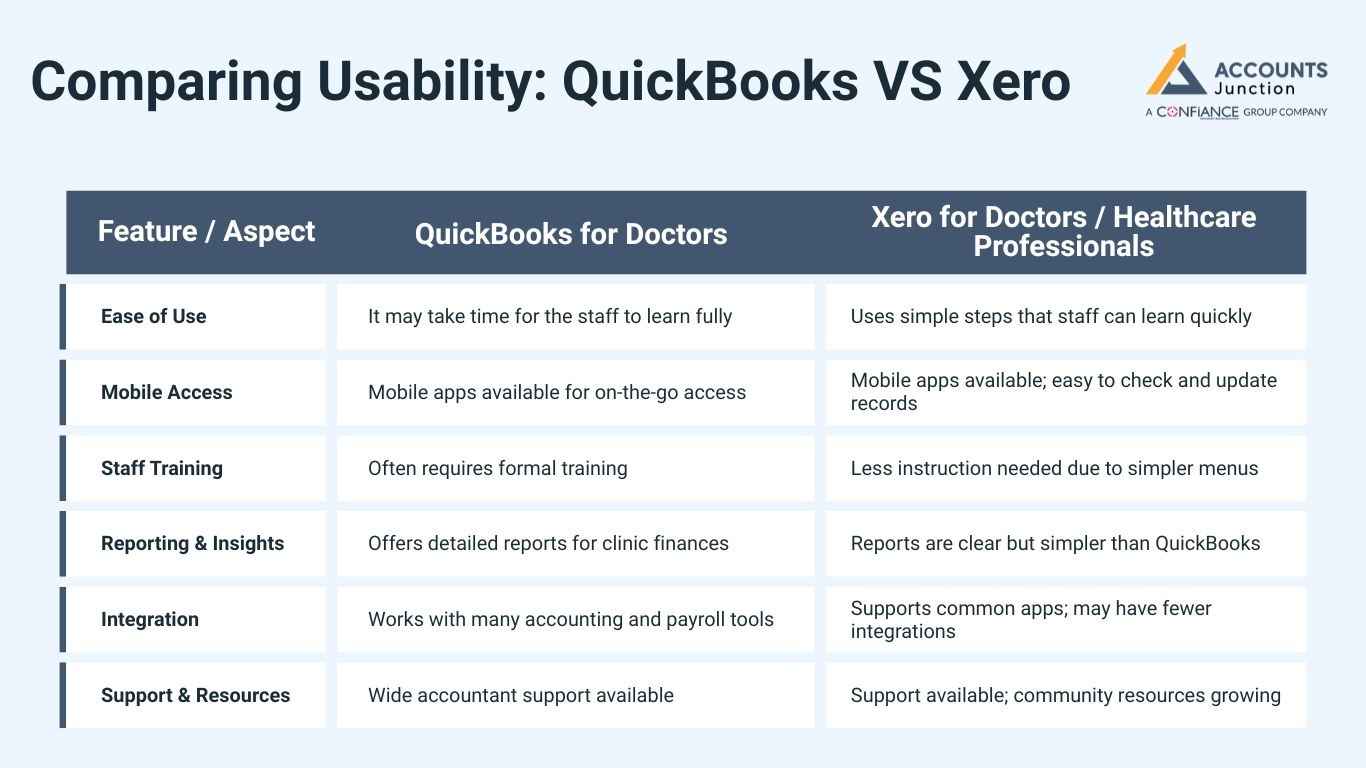
Comparing QuickBooks VS Xero helps clinics choose the best software for daily tasks.
|
Feature / Aspect |
QuickBooks for Doctors |
Xero for Doctors / Healthcare Professionals |
|
Ease of Use |
It may take time for the staff to learn fully |
Uses simple steps that staff can learn quickly |
|
Mobile Access |
Mobile apps available for on-the-go access |
Mobile apps available; easy to check and update records |
|
Staff Training |
Often requires formal training |
Less instruction needed due to simpler menus |
|
Reporting & Insights |
Offers detailed reports for clinic finances |
Reports are clear but simpler than QuickBooks |
|
Integration |
Works with many accounting and payroll tools |
Supports common apps; may have fewer integrations |
|
Support & Resources |
Wide accountant support available |
Support available; community resources growing |
When comparing QuickBooks VS Xero, clinics should consider ease of use. QuickBooks VS Xero both offer mobile access, but training needs differ. Choosing the right software can save time and reduce errors in daily clinic tasks.
Cost Comparison Between QuickBooks VS Xero
-
Pricing Plans
QuickBooks costs may be higher, but include payroll and reports.
Xero For Doctors may have cheaper monthly plans for small clinics.
-
Extra Features
Both charge more for extra reports or software links.
Doctors should weigh cost against the features they really need.
-
Cost Efficiency
Xero may be cheaper for clinics without large payroll needs.
QuickBooks VS Xero pricing depends on clinic size and staff count.
Integration with Medical Practice Systems
-
EMR Integration
QuickBooks may link with billing and patient management software. Xero for Healthcare Professionals may connect with cloud EMR platforms easily.
-
Bank and Payment Systems
Both QuickBooks VS Xero support bank connections for easy updates. Automatic syncing reduces errors and saves staff time every day.
-
Workflow Efficiency
Good integration keeps clinic work smooth and organized daily. Doctors spend less time checking accounts or correcting mistakes manually.
Security and Compliance Features
-
Data Security
QuickBooks keeps money and patient data safe with strong locks. Xero for Healthcare Professionals uses cloud locks to keep data secure online.
-
Compliance Management
Both systems follow tax rules and local laws automatically. Regular backups prevent loss of financial records for clinics.
-
Audit Preparation
QuickBooks makes audit-ready reports that doctors can send quickly. Xero For Doctors stores records safely for inspections and checks.
Advantages of QuickBooks VS Xero for Doctors
QuickBooks Advantages
-
Payroll and Tax
QuickBooks can pay staff and do taxes for any clinic. It can count staff pay and taxes each month right.
-
Clear Reports
Reports show income, costs, and profit in a clear way. Doctors can make smart choices with these easy-to-read reports.
-
Accountant Help
Many accountants know QuickBooks and help clinics work well. This help can cut mistakes and make staff work faster.
-
Tool Links
QuickBooks can link with clinic bills and software with ease. Linking accounts saves staff time and cuts work each day.
-
Auto Work
QuickBooks can do bills, invoices, and reminders on its own. Auto work cuts mistakes and keeps money tasks on time.
Advantages of Using Xero
-
Cloud Work
Xero lets staff work together at the same time online. Doctors can check money and bills from any safe device.
-
Easy Daily Work
Xero makes daily work easy with short menus and steps. It cuts time spent on data entry or fixing errors.
-
Quick View
Dashboards and reports show doctors a clear view of cash. Doctors can track payments, costs, and profits fast each day.
-
Team Work
Xero lets staff work at the same time with no mistakes. All users can add info and see it right away.
-
Bank Feed
Xero brings bank info in by itself for the right records. This cuts mistakes and speeds up daily money work.
Limitations with QuickBooks and Xero
QuickBooks Problems
-
Hard to Learn
QuickBooks can be hard for new staff with no past experience. Staff may need help to use all parts correctly.
-
High Cost
Full tools may cost more for clinics that need all parts. Small clinics may find monthly plans too high for small work.
-
Hard Menus
Some users may find QuickBooks menus busy and hard to use. New staff may feel lost using many parts at once.
-
Cloud Limits
QuickBooks cloud may be slow if many staff members work together. Many users at once may need extra steps to connect.
-
Extra Costs
Some extra tools or links may cost clinics more money. Clinics may pay extra to use some added parts faster.
Xero Limitations
-
Payroll Weak
Xero payroll is not as strong as QuickBooks payroll tools. Big clinics may need extra tools to pay staff correctly.
-
Reports Weak
Some reports may be small for large clinics with hard needs. Doctors may need extra tools for bigger financial reports.
-
New Tools Hard
Staff may still need help to use some new Xero tools. Some auto tools may need a guide to use at first.
-
Link Problems
Some old software may not link with Xero fast. Clinics may experience delays syncing old tools with Xero.
-
Report Limits
Some dashboards or reports may be hard to change. Doctors may have fewer choices to set reports as needed.
How to Choose Between QuickBooks VS Xero for Doctors
-
Assess Clinic Size
Big clinics may benefit from QuickBooks payroll and reports. Small clinics may find Xero For Healthcare professionals simpler and cheaper.
-
Evaluate Staff Skills
Tech-friendly staff may use either software with ease. Non-technical staff may learn Xero faster with little help.
-
Integration Needs
Check which software links with your EMR and other tools. Proper connections reduce manual work and mistakes every day.
-
Cost Consideration
Doctors should balance cost and features carefully before buying. Some clinics may pick cheaper software with essential tools only.
-
Future Growth
Think about clinic growth before choosing software for long-term use. Software must adapt to more staff, locations, and financial work.
Tips for Doctors Using Accounting Software
- Update records daily to avoid mistakes in bills and payroll.
- Use cloud access for staff collaboration and fast updates.
- Train staff to handle software properly for smooth operations.
- Generate monthly reports to track money, costs, and profits.
- Choose software that links with existing clinic tools well.
Doctors must choose software that fits the clinic's size and staff skills. QuickBooks may suit clinics needing payroll and advanced reports. Xero For Doctors may suit clinics wanting simplicity and cloud access. Choosing the right software may save time, reduce mistakes, and improve workflow.
Accounts Junction helps medical clinics handle accounting and financial records well. Our experts guide clinics in payroll, bills, and tax tasks properly. We ensure reports are clear and delivered on time every month. Clinics may reduce errors and focus more on patient care. Accounts Junction also helps doctors pick software that fits clinic's needs and growth.
Proper accounting tools and expert help may improve clinic work. Doctors can save time, reduce mistakes, and manage money clearly.
FAQs
1. Which software is easier for small clinics?
- Xero may be easier with simple menus and cloud access.
2. Can QuickBooks handle clinic payroll efficiently?
- Yes, QuickBooks may calculate staff salaries and taxes correctly.
3. Is Xero for Doctors suitable for large practices?
- It may work, but payroll for many staff could be harder.
4. Which software integrates better with EMR systems?
- Xero may connect better with cloud-based EMR platforms smoothly.
5. Are QuickBooks and Xero secure for sensitive data?
- Yes, both systems use locks and backups to protect data.
6. Which software requires less staff training?
- Xero For Doctors may need less training due to simple menus.
7. Can QuickBooks generate advanced financial reports?
- Yes, QuickBooks gives detailed reports for taxes and profits.
8. Does Xero support automatic bank feeds?
- Yes, Xero For Medical Professionals can sync accounts automatically daily.
9. Which is more cost-effective for small clinics?
- Xero may be cheaper and cover the main accounting needs well.
10. Can QuickBooks and Xero handle multi-location clinics?
- Yes, both may support many locations with clear consolidated reports.
11. Is mobile access available in QuickBooks and Xero?
- Yes, both apps let doctors manage accounts on mobile devices.
12. Does Xero support real-time collaboration for clinic staff?
- Yes, staff can work at the same time without conflicts.
13. Can QuickBooks import past accounting data easily?
- Yes, importing old records may be done for a smooth transition.
14. Does Xero provide dashboards for financial insights?
- Yes, Xero For Medical professionals shows dashboards for quick clinic reviews.
15. Which software handles taxes better for clinics?
- QuickBooks may give stronger payroll and tax features than Xero.
16. Can both QuickBooks and Xero generate invoices automatically?
- Yes, both may send invoices to patients or insurance quickly.
17. Which is better for cloud-based accounting?
- Xero may be easier for online access and real-time work.
18. Are updates automatic in QuickBooks and Xero?
- Yes, both software may update features and security automatically.
19. Can QuickBooks VS Xero reduce manual accounting errors?
- Yes, both may reduce errors using automation and clear workflows.
20. Which software is preferred by medical accountants?
- Preferences vary based on clinic size and accounting complexity.