
Law Firm Accounting Software Comparison: Which One Suits Your Practice?
Choosing the right law firm accounting software is key to running your firm well. Good software helps track client funds, manage bills, and keep books clear. It cuts errors, saves time, and shows your finances in an easy way. The right system helps sort data, watch trust accounts, and make correct invoices. It lets your team work fast and focus more on clients than on paperwork. It also tracks case costs, spots late payments, and makes clear reports. Staff can access records from any place, making work from home easy and keeping the team in sync. In this blog, we will guide you through the top options, compare their features, and help you find software that fits your law firm perfectly.
Why Accounting for Law Firms is Different
Law firms have special accounting needs. Unlike normal businesses, they must manage client trust accounts, track billable hours, and follow strict rules. Regular accounting tools can cause errors and waste time. Law firms also handle many client cases at once, making tracking hard. They need clear reports to see the profit for each case. Security is key, as client money and info must stay safe. Using law firm accounting software helps manage these needs efficiently.
Key Needs in Law Firm Accounting Software
- Trust accounting: Keep client funds separate from firm funds.
- Time tracking: Log hours per client correctly.
- Billing and invoicing: Make clear, easy-to-read invoices.
- Case reports: Track money in and out per case.
- Data safety: Keep client info secure and private.
Popular Law Firm Accounting Software Options
Here are some top software choices for accounting for law firms:
1. Clio Manage
Clio is a popular choice for small to mid-sized law firms. It offers:
- Time tracking
- Billing tools
- Trust accounting
- Cloud access for remote work
2. QuickBooks for Law Firms
QuickBooks is widely known but has versions designed for law offices. It provides:
- Expense tracking
- Invoice management
- Integration with legal practice tools
3. CosmoLex
CosmoLex combines billing, accounting, and practice management. Key features include:
- Built-in trust accounting
- Legal billing templates
- Simple bookkeeping for lawyers
4. PracticePanther
PracticePanther helps law firms stay organized. It offers:
- Automated billing
- Expense and invoice tracking
- Time management tools
5. Zola Suite
Zola Suite is a full-featured law firm software with accounting built in. It includes:
- Integrated trust accounting
- Time and expense tracking
- Automated billing and reporting
6. Rocket Matter
Rocket Matter is a cloud-based software for law firms. It provides:
- Case and billing management
- Time tracking per client
- Trust accounting and payment tools
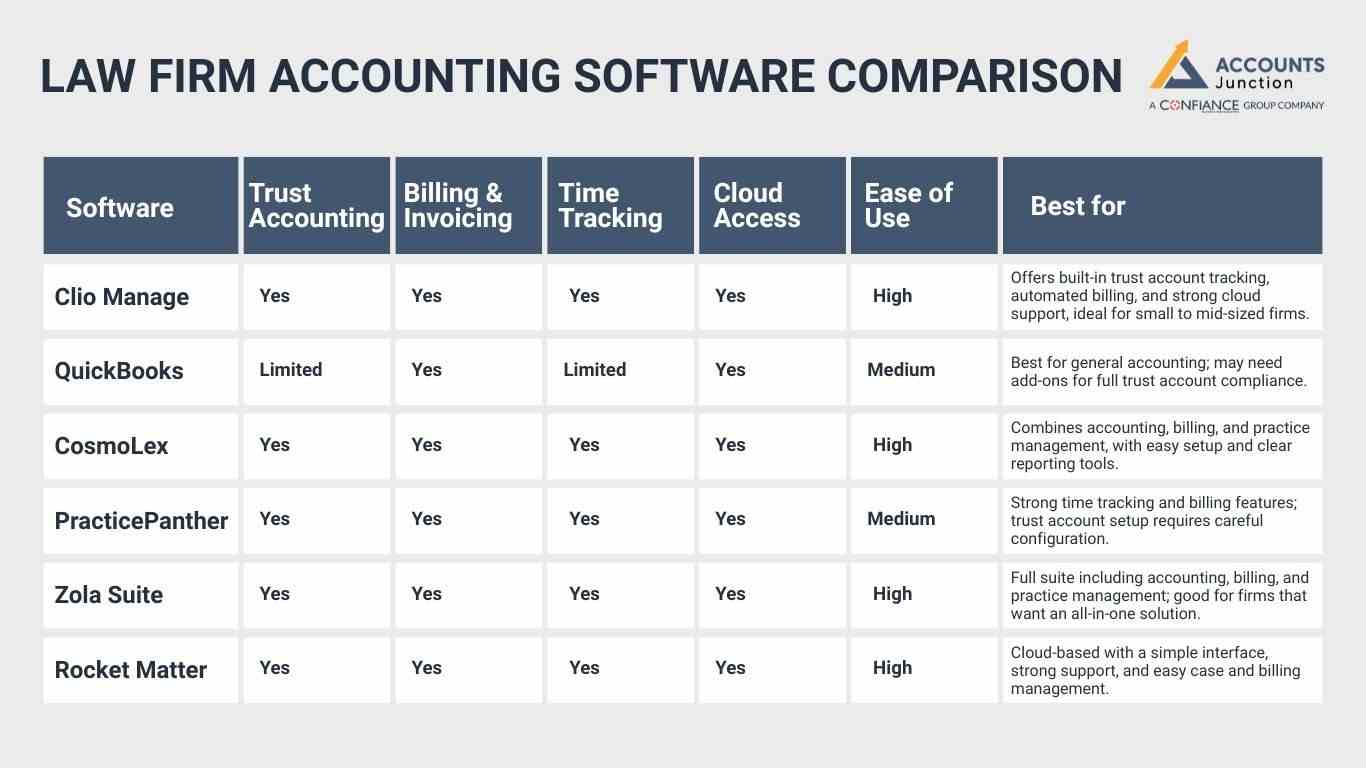
Law Firm Accounting Software Comparison
Here is a detailed look at top law firm accounting software, focusing on key features and user experience:
|
Software |
Trust Accounting |
Billing & Invoicing |
Time Tracking |
Cloud Access |
Ease of Use |
Best for |
|
|
Clio Manage |
Yes |
Yes |
Yes |
Yes |
High |
Offers built-in trust account tracking, automated billing, and strong cloud support, ideal for small to mid-sized firms. |
|
|
QuickBooks |
Limited |
Yes |
Limited |
Yes |
Medium |
Best for general accounting; may need add-ons for full trust account compliance. |
|
|
CosmoLex |
Yes |
Yes |
Yes |
Yes |
High |
|
|
|
PracticePanther |
Yes |
Yes |
Yes |
Yes |
Medium |
Strong time tracking and billing features; trust account setup requires careful configuration. |
|
|
Zola Suite |
Yes |
Yes |
Yes |
Yes |
High |
|
|
|
Rocket Matter |
Yes |
Yes |
Yes |
Yes |
High |
Cloud-based with a simple interface, strong support, and easy case and billing management. |
Integration with Other Tools
When selecting software, it’s important to see how well it connects with your firm’s existing apps. Smooth links between tools make daily work easier and reduce data issues.
1. Time and Error Management
- Strong integration helps save time and avoid repeated data entry.
- It also cuts down on manual errors that can affect your work.
2. Added Tool Connections
- Some platforms, like Clio or CosmoLex, link with legal research and client management apps.
- These added links make it easier to manage both clients and cases in one place.
3. Data Flow for Key Processes
- Ensure the software moves data smoothly for accounting, reports, and tax needs.
- Firms using multiple apps benefit from systems that share data without limits.
4. Workflow and Record Accuracy
- Smooth links help staff work faster and keep information up to date.
- Proper integration also tracks client payments clearly and keeps case notes organized for review.
How to Choose the Right Software
Choosing software depends on your firm's size, budget, and needs. Ask these questions:
- Do you need cloud access?
- How many users will use the system?
- Do you need trust accounting?
- What is your budget?
Pick software that fits how your firm works. A firm with many lawyers needs software that all users can use at once and that gives clear reports. If your team works from home, cloud access is best. Firms with trust accounts need software that tracks client money right and follows rules.
Key Points to Consider
- Ease of use: Software should be simple to learn.
- Integration: Works with your other tools.
- Support: Quick help when there are problems.
- Cost: Fits your budget and gives value.
- Safety: Keeps client and firm data safe.
- Growth: Can grow as your firm grows.
- Reports: Gives clear, easy-to-read data per case.
Tips for Selection
- Try free trials to see if it fits your firm.
- Check support and response times.
- Compare the cost to the needed features.
- Read reviews from other law firms.
- Ensure data is safe and rules are met.
Looking at these points helps you pick software that saves time, keeps your firm legal, and helps your business grow. Proper choice ensures smooth accounting for law firms.
Common Challenges in Law Firm Accounting
Even with good software, law firms face key challenges. Knowing them helps plan better and manage accounting well.
-
Multiple Accounts
Handling many client accounts at once is hard. Each account must be tracked for funds, invoices, and payments. Errors can cause problems. Good software and clear steps help prevent mistakes.
-
Compliance
Law firms must follow strict rules for trust accounts and billing. Mistakes can lead to fines or penalties. Using software that supports rules and regular checks keeps the firm safe.
-
Time Tracking
Tracking billable hours is key. Errors can lead to lost money or billing issues. Software that logs hours and staff training ensures accurate and timely billing for all clients.
-
Expense Tracking
All expenses must be logged correctly, from office costs to client spend. Wrong entries affect profit and taxes. Using software to track and sort expenses keeps finances clear.
-
Security
Keeping client and firm data safe is vital. Breaches harm trust and can cause legal issues. Strong passwords, encrypted storage, and safe cloud solutions protect sensitive information.
-
Staff Training
Software fails if staff do not know how to use it. Training helps avoid mistakes. Simple guides and regular sessions make sure staff work correctly and with confidence.
-
Reporting
Clear, correct reports are key to decisions. Poor reports hide unpaid bills or case costs. Good software gives easy-to-read reports to track profits, expenses, and client billing fast and well.
Using the right software and following best practices can reduce these challenges, save time, and improve client trust.
Real-World Examples of Software Use
Here are some real-life examples showing how law firms benefit from accounting software:
- Small firm in Texas: A firm used Clio Manage to handle ten client accounts at once. Staff saved five hours per week as invoices and trust accounts were updated automatically, reducing errors.
- Mid-size firm in Florida: CosmoLex helped the firm combine billing, time tracking, and accounting in one system. Reports showed which cases were most profitable, improving decisions and client trust.
- Remote team in California: Rocket Matter allowed lawyers working from different locations to log hours and track expenses easily. The firm reduced delays in billing and improved overall workflow efficiency.
- Boutique firm in New York: PracticePanther helped track all client matters and billable hours efficiently. The firm could produce accurate invoices quickly, spot overdue payments, and focus more on client service, boosting satisfaction and trust.
At Accounts Junction, we specialize in accounting for law firms. Our services help you manage books, handle billing, and stay compliant. We work with various software solutions and can guide your firm to pick the right one. Using our expertise, you can save time, reduce errors, and focus on growing your practice.
We offer:
- Trust account management
- Invoice and billing support
- Payroll and expense tracking
Through our services, your law firm can run smoothly without worrying about financial details. Our team ensures that your accounting aligns with legal rules and your firm’s needs.
FAQs
1. What makes accounting for law firms software different from regular software?
- It has trust accounting, time tracking, and legal billing features.
2. Can small law firms use cloud-based accounting software?
- Yes, cloud software is ideal for small teams with remote work.
3. Is training needed for law firm accounting software?
- Yes, even simple software needs basic setup and use training.
4. Can software track billable hours automatically?
- Most top software tracks hours and links them to invoices.
5. How do I choose the right software for my law firm?
- Check features, pricing, support, and try free demos.
6. Does Account Junction offer software setup help?
- Yes, we guide firms through setup and train staff.
7. Can accounting software help with tax filing?
- Yes, it organizes expenses and income for easier filing.
8. Is trust account compliance included in all software?
- No, only law-specific software like Clio or CosmoLex includes it.
9. Can software help reduce billing errors?
- Yes, accurate tracking and automated invoicing lower mistakes and save time.
10. Will software help my firm grow?
- Yes, organized accounting and clear reports support better decisions and firm growth.
11. Can software manage multiple client accounts at once?
- Yes, it tracks each client’s funds, invoices, and payments clearly.
12. Can I integrate law firm software with other tools?
- Yes, most top solutions link to email, calendars, and practice management apps.
13. How does software help with expense tracking?
- It logs office and client expenses and organizes them for easy review.
14. Will software make reporting easier?
- Yes, it creates clear, accurate reports for case costs, profits, and billing.
15. Can accounting software reduce audit risks?
- Yes, it keeps accurate records and flags errors before issues arise.