
Free Small Business Accounting Software vs Paid Tools: Which Is Better?
Running a small business needs clear control of money every day. Choosing the right accounting software helps track finances effectively and quickly. Free small business accounting software is popular among small startups today. It gives basic tools without adding any upfront costs.
Paid accounting tools offer more features for growing business needs. They include payroll, tax tracking, and multi-user access for teams. Understanding differences between free and paid options improves decision-making. This blog helps choose software that matches business requirements.
What is Free Small Business Accounting Software?
Free small business accounting software provides basic bookkeeping for small companies. It tracks money, invoices, and simple reports easily.
-
Expense Tracking
Records costs and sorts them correctly. Shows basic charts to understand spending clearly each month.
-
Invoice Management
Creates and sends invoices quickly to clients. Sends reminders automatically for overdue customer payments on time.
-
Reporting
Generates profit and loss statements with simple analysis. Offers enough information to track growth and spending properly.
-
Dashboard
Shows an overview of cash flow and balances. Helps owners monitor accounts without advanced financial knowledge needed.
-
Customer and Vendor Management
Stores contact and payment information. Keeps transaction history with simple tools for small customization options.
Free software lowers startup costs but has limited reporting and tools. Many small entrepreneurs start with Free financial management software for basic control.
What Are Paid Accounting Tools?
Paid tools give full help for accounts and taxes. They let more than one user work and link with other business apps.
-
Advanced Reporting
Shows clear reports and charts. Helps track trends and guess future income and costs.
-
Bank Integration
Connects your accounts to the bank. Makes checking and matching easy. Saves time every day.
-
Payroll Management
Pays staff, takes out taxes, and handles deductions automatically. Cuts errors and keeps rules.
-
Tax Compliance
Works out taxes and makes filing simple. Updates with law changes to avoid mistakes.
- Multi-User Support
Unlike free small business accounting software, paid tools let team members access accounts simultaneously while keeping data secure.
Paid tools cost money but provide support, security, and scalability. They are best for businesses that plan growth over time.
Comparison of Free Small Business Accounting Software vs Paid Tools
|
Comparison |
Free Small Business Accounting Software |
Paid Tools |
|
Cost |
Costs nothing and helps startups save money. Useful for early-stage companies with limited budgets. |
Charges monthly or yearly fees based on features. Higher cost brings better efficiency and tools. |
|
Features |
Handles basic tasks like invoicing and expense tracking. Small firms can use free small business accounting software for simple accounting needs. |
Covers reports, payroll, budgets, and tax management. Supports larger teams and complex financial processes. |
|
Support |
Offers only forums or email help. Updates are slower and fewer features are added regularly. |
Provides live chat, email, and phone support. Regular updates improve features and security reliably. |
|
Scalability |
Works for low transaction volume or single users. Not ideal for fast-growing companies. |
Scales with business size and team expansion smoothly. Supports multiple users and heavy transaction loads. |
|
Security |
Provides basic security for online stored data. Sufficient for low-risk accounts and small transactions. |
Offers encryption, cloud backup, and strong security. Protects sensitive financial data from cyber threats and loss. |
When to Choose Free Small Business Accounting Software
Ideal for Startups
- New businesses with low transactions benefit from free small business accounting software. Tracks costs and revenue without putting pressure on funds.
Simple Accounting Needs
- Free financial management software reduces complexity for owners without accounting experience.
Testing Before Payment
- Free financial management software lets businesses try features before upgrading later. Helps understand workflow without spending money unnecessarily.
Cost Control
- Businesses with tight budgets prefer free small business accounting software. Maintains key bookkeeping functions while minimizing startup expenses.
When Paid Tools Are Better
Growing Businesses
- Growing firms need reports, payroll, and tax work fast. Paid tools help many users and track all cash.
Integration Needs
- Firms that link banks or apps need paid tools. Saves time and cuts repeated work for each month.
Complex Accounting
- Firms that need budgets, plans, and tax use paid tools. Handles work beyond simple bills or cost tracking.
Time and Accuracy
- Paid tools cut manual work and reduce human errors. Let's teams focus on growth and plan for the future.
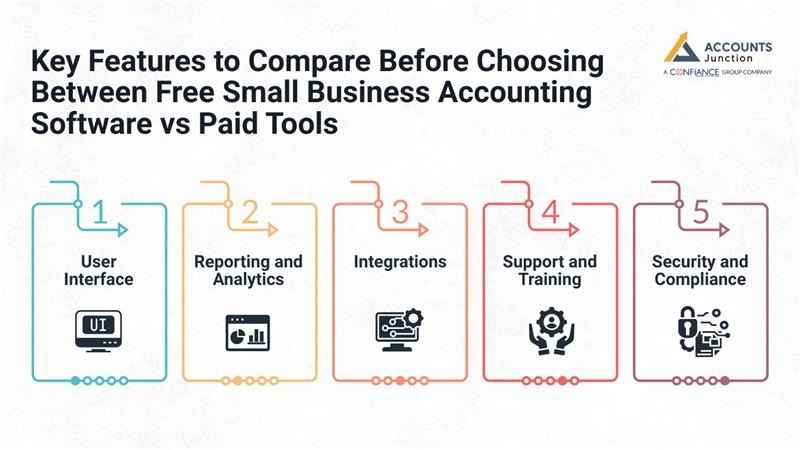
Key Features to Compare Before Choosing Between Free Small Business Accounting Software vs Paid Tools
1. User Interface
- Free tools have simple layouts that are easy to learn. Some lack options for reports or dashboard changes.
- Paid tools offer polished dashboards that are easy to use. Helps teams work faster and improves overall workflow.
2. Reporting and Analytics
- Free software gives basic charts and simple reports only. Good for small startups, but misses deep insights.
- Paid tools provide detailed trends and custom reports easily.Helps firms make decisions with clear and correct data.
3. Integrations
- Free software links to a few apps and tools only. Manual work is needed across systems for some tasks.
- Paid tools connect to banks, marketplaces, and apps. Reduces repeated data entry and keeps the workflow smooth.
4. Support and Training
- Free small business accounting software often relies on forums or written guides. Quick help may not come when urgent issues occur.
- Paid tools provide live chat, tutorials, and support teams. Solves problems fast and improves the user experience.
5. Security and Compliance
- Free software gives basic online security for small tasks. Free financial management software works well for small firms with low-risk accounts and simple transactions.
- Paid tools offer strong encryption, backup, and compliance. Keeps data safe and meets legal rules efficiently.
Pros and Cons of Free Small Business Accounting Software
Pros:
- No cost helps startups save money and resources fast. Tracks income and costs without adding extra financial stress.
- Free small business accounting software has a simple interface that allows quick use without any training.
- Free financial management software provides a quick setup, so new businesses can start tasks immediately. Saves time and starts bookkeeping without delay or hassle.
Cons:
- Free small business accounting software may have limited features, which can block growth or detailed reporting. Manual work may still be needed for full analysis.
- Not fit for growing firms needing payroll or taxes. Expansion may require moving to paid tools later.
- Support is low or slow for urgent issues sometimes. Late help can affect key decisions for business owners.
Pros and Cons of Paid Tools
Pros:
- Advanced tools help with budget, payroll, and reports fast. Gives firms clear data to plan and grow well.
- Scalable options suit many users and large data sets. Let's firms keep the same software as they grow.
- Strong security and backups protect sensitive data well. Cut the risk of data loss or cyber attacks on accounts.
Cons:
- Subscription fees can be high for new small firms. Costs rise with more features, but improve work efficiency.
- Hard learning curve for first-time business owners. Training is needed to use all advanced features fully.
- Tools can overwhelm firms with only basic accounting needs. Complex features may slow adoption for small teams.
Popular Free Small Business Accounting Software Options
- Wave Accounting
Free bills, costs, and reports for small firms. Good for new firms with small and simple needs.
- ZipBooks
Free plan for basic books and invoice work. Gives easy charts and simple tools for small teams.
- GnuCash
Free software for books and reports for small firms. Works offline for firms that need local software use.
- SlickPie
Online books with auto-entry for small tasks. Cuts repeat work for startups with small daily deals.
- Akaunting
Free cloud books and simple reports for small firms. Let's users track cash and basic tasks with ease.
Popular Paid Accounting Tools
-
QuickBooks Online
Gives reports and data for mid-size business needs. Helps track cash, income, and spending every single day.
-
Xero
Cloud accounting helps with payroll, tax, and reports. Saves time and lowers mistakes in daily money tasks.
-
FreshBooks
Simple invoicing and accounts suit small teams or freelancers. Makes billing and costs easy to manage and check.
-
Sage Business Cloud
Payroll and account tools help teams track money. Let multiple users work and follow all rules.
-
Zoho Books
Automates tasks and reports for growing small firms. Links with other tools to manage money faster.
Tips for Choosing Between Free and Paid Software
- Know your business needs and growth plans. Helps pick software that fits now and in the future.
- Compare features of free software closely. Makes sure it works with your tasks and reports.
- Check security and backup features. Keeps financial data safe from threats and loss.
- Look at integration with banks and other tools. Cuts manual work and saves time daily.
- Consider support, updates, and training. Ensures smooth use and quick help when needed.
- Try free tools first before buying paid ones. Gives real experience and shows which features matter.
Choosing between free small business accounting software and paid tools depends on scale, budget, and needs. Free financial management software works well for startups or simple accounting tasks. Paid tools suit growing firms needing extra features, integration, and security.
Accounts Junction provides accounting and bookkeeping services for small businesses. We handle records, post entries, and check all accounts. We prepare reports that show income, costs, and profits. We also file taxes on time and ensure they are correct.
With our services, businesses keep full control of their money. Our accounting saves time, cuts mistakes, and helps steady growth. Partner with us for reliable and simple financial management.
FAQs
1. What is free small business accounting software?
- It gives basic bookkeeping tools for small firms and startups.
- Users can track money, invoices, and simple reports easily.
2. Can free software handle invoicing for small businesses?
- Yes, it creates and sends invoices to clients quickly.
- Some tools also remind clients about late payments automatically.
3. Is free financial management software safe for business data?
- It has basic protection for online financial data storage.
- Paid tools provide stronger security for sensitive company information.
4. Can free accounting software track expenses effectively?
- Yes, it records costs and sorts them for reporting.
- Charts show spending patterns clearly to help small businesses.
5. Does free software allow multiple users for teams?
- Limited access is available, suitable only for very small teams.
- Paid software allows multiple team members to work safely together.
6. Can free software connect with banks or payment apps?
- Most free tools do not link with banks or apps fully.
- Paid software connects directly to banks and payment apps automatically.
7. Is free software suitable for tax calculation?
- It can handle simple taxes but lacks full compliance tools.
- Paid tools calculate taxes and prepare filings without errors easily.
8. Can free tools generate financial reports for review?
- Yes, they make simple profit, loss, and cash flow reports.
- Paid tools give detailed and customizable charts for decisions.
9. Are free tools enough for growing companies?
- No, they lack payroll, reports, and multi-user support features.
- Paid software scales well for teams and high transaction volumes.
10. Can I switch from free to paid software later?
- Yes, most paid platforms allow easy migration of financial data.
- This keeps records safe when your business grows further.
11. Do paid tools save time for bookkeeping?
- Yes, automation reduces manual entry and mistakes effectively for firms.
- It allows focus on planning and business growth instead.
12. Which is better for startups, free or paid software?
- Free tools work for small firms with simple accounting needs.
- Paid tools become useful when a company grows and expands.
13. Can free software manage employee payroll?
- No, most free tools do not handle payroll fully or accurately.
- Paid tools automate salary, taxes, and deductions efficiently.
14. Do paid tools support cloud access for teams?
- Yes, paid accounting software works online for access anywhere.
- Teams can collaborate and see live data securely in real time.
15. Are free tools reliable for cash-based small businesses?
- Yes, they track simple income and expenses without extra cost.
- They work best when transaction volumes are low and simple.
16. How do free and paid tools differ in reports?
- Free software gives basic charts and simple reports only.
- Paid tools offer detailed, customizable, and advanced financial reports.
17. Can free accounting software help with budgeting?
- Basic budget tracking is possible, but options are limited.
- Paid software offers full budgeting, forecasting, and scenario planning easily.
18. Are there hidden costs in free software?
- Some free tools charge for extra features or higher limits.
- Paid tools have clear pricing with all features included upfront.
19. How does support differ in free and paid tools?
- Free software mostly provides forum and email support only.
- Paid tools offer live chat, email, and phone support easily.
20. Which software type is better for long-term growth?
- Free tools work for startups or small operations in early stages.
- Paid software suits growing businesses needing advanced features and scale.