
What Are the Key Features of Sage Accounting Software?
Accounting software is used across many industries to improve the efficiency of accounting. Sage accounting is one of the old accounting software programs that is liked and used by many accounting firms and accountants.
It is a cloud-based accounting software that is well-equipped with rich features that are capable of doing most accounting tasks. Several Sage accounting packages have made it easier for small as well as large businesses to use them cost-effectively. This software has helped to get better control over bookkeeping and other accounting tasks.
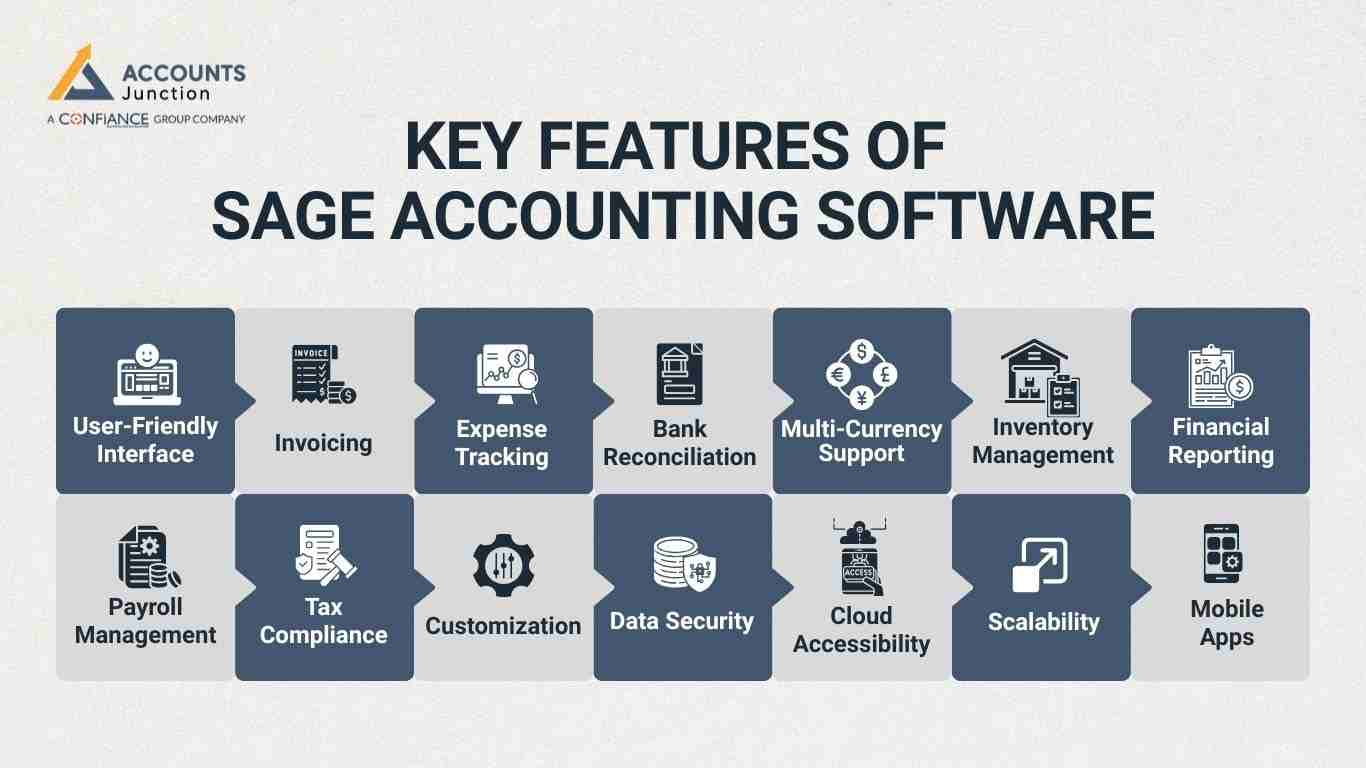
Key Features of Sage Accounting Software
Here are some of the key features of Sage Accounting software:
-
User-Friendly Interface
Sage's user-friendly interface is designed to be intuitive, making it easy for users to navigate and access the software's various functions.
-
Invoicing
Sage allows users to create professional invoices, customize templates, and send them directly to clients. Using specific Sage accounting packages, you can do recurring invoices.
-
Expense Tracking
Users can easily record and categorize expenses, making it simple to track and manage company spending. This feature is especially useful for tracking tax-deductible expenses.
-
Bank Reconciliation
Sage enables users to reconcile their bank accounts with ease, ensuring that financial records match the actual bank statements, which is crucial for accurate financial reporting.
-
Multi-Currency Support
Sage offers multi-currency support, helping to manage transactions and accounts in different currencies.
-
Inventory Management
Key Sage accounting packages help firms track stock with simple, clear screens. They can improve stock levels, orders, and sales to help with inventory control.
-
Financial Reporting
Sage provides a range of financial reporting tools to generate various financial statements. These include income statements, balance sheets, and cash flow statements, which help in making proper decisions.
-
Payroll Management
Sage offers payroll processing features to calculate and manage employee salaries, deductions, and tax contributions. It can ensure better compliance with tax regulations in payroll.
-
Tax Compliance
Sage assists in managing tax-related tasks, from calculating taxes to generating reports and filing returns. This feature is crucial for maintaining compliance with local tax authorities.
-
Customization
Users can tailor Sage to their specific business needs by customizing reports, templates, and other aspects of the software to fit their unique requirements.
-
Data Security
Sage prioritizes data security, offering robust encryption and access controls to safeguard sensitive financial information.
-
Cloud Accessibility
Sage provides cloud-based options, allowing users to access their financial data from anywhere online. This is particularly valuable for businesses with remote teams or multiple locations.
-
Scalability
Firms may shift to higher sage accounting packages as their work grows with time. Users can easily upgrade to more advanced versions with additional features as their business expands.
-
Mobile Apps
Sage offers mobile apps for both iOS and Android devices, granting users the flexibility to manage finances. These apps can help create and send invoices or check bank balances.
These are some of the key features of Sage accounting software that have made most accounting tasks simpler. This accounting software can bring a better level of efficiency to the accounting work of the organization.
How Sage Accounting May Support Daily Business Decisions
Real Time View of Money Flow
- Sage may show updated numbers as money moves in and out.
- This can help owners see where cash rises or falls.
Quick Insight Into Sales Trends
- Users may view sales charts for each day.
- Slow days or high activity may stand out at once.
Fast Check on Unpaid Invoices
- It can list all bills that still wait for payment.
- Teams may plan follow up calls with less delay.
Clear View of Daily Costs
- Expense lists may reveal hidden cost spikes.
- This helps users plan what to cut or keep.
Support for Small Daily Choices
- When users see clear data, they may act with more ease.
- This can help keep small issues from turning large.
Help With Short-Term Planning
- Daily data may guide next-day stock orders.
- It can show when teams must pause or push sales.
Early Signal for Cash Issues
- Sudden drops may show risk signs.
- Owners can take soft steps early to manage the dip.
How Sage Helps Teams Work Better Together
Shared Access for All Team Members
- Everyone may work on the same file at the same time.
- Changes appear right away, which may reduce mix-ups.
Role-Based Permission Control
- These role tools come built into many Sage accounting packages for safe work.
- This may help guard sensitive data.
Smooth Work for Remote Teams
- People in different places can join the same tasks.
- This removes long waits for file transfers.
Better Coordination Across Tasks
- One person may handle invoices while another checks bank data.
- Sage may reduce overlap between jobs.
Early Detection of Team Errors
- When data updates live, mistakes may show fast.
- The team may fix entries before they spread.
Less Need for Calls or Emails
- Since all data stays synced, teams may not need updates often.
- This can save time and keep focus steady.
Support for Large and Small Teams
- A small team may run all tasks with ease.
- A large team may set clear roles without confusion.
How Sage May Reduce Manual Work Over Time
Stored Vendor and Client Details
- Sage may save key info for repeated use.
- Users can fill forms faster with stored data.
Saved Invoice Templates
- Common invoice styles can be saved once.
- Users can reuse them for faster billing.
Auto-filled Form Fields
- Some sage accounting packages use smart fill tools that cut long steps.
- This can reduce typing and cut errors.
Quick Upload of Bills and Receipts
- Users can keep files online for easy recall.
- This may save time when checking old records.
Bank Data Sync Option
- In many cases bank data may pull in directly.
- This can help avoid long manual checks.
Reduced Repetition in Daily Work
- Since many steps become short, users may finish early.
- This may free time for other work.
Fewer Input Errors Over Time
- Auto fill may cut slips that come from rushing.
- Teams may feel less tired after long days.
Limits That Users May Need To Know
Plan-Based Limits in Features
- Some tools may only appear in higher plans.
- A growing firm may shift plans with time
Learning Time for New Users
- A new user may feel slow at first.
- The layout often becomes clear after some use.
Sync Issues With Older Systems
- Some old tools may not link with Sage.
- Users may need to check if their system matches.
Region-Based Gaps in Tax Tools
- Not all tax forms show in all regions.
- Users may need to confirm local support.
Extra Cost for Advanced Features
- Some features may need add-ons.
- Firms must check what fits their budget.
Limits on Custom Layouts
- Certain screens may not fully change as needed.
- Users may still adjust many parts to a good extent.
Support Availability Based on Plan
- Higher plans may get faster support.
- Basic plans may have fewer help options.
How Sage May Improve Cash Flow Awareness
-
Real Time Cash Flow View
Most Sage accounting packages show cash flow with fast, clear charts. Users can see new cash details fast on screen.
-
Clear View of Incoming Funds
Sage may show paid bills in a clean view. Users can see money coming in with clear pages.
-
Early Alerts on Pending Bills
The screen may mark bills that need quick work. Firms can check due dates before any issue starts.
-
Support During Tight Cash Periods
Hard weeks may feel light with simple cash facts. Users can plan smart steps when low cash hits.
-
Better Insight Into Outgoing Payments
Sage may show money going out in neat lists. Firms can track big costs and make smart moves.
-
Stronger Planning for Future Weeks
Users may see cash trends grow in simple charts. These trends may guide better money plans each week.
-
Fewer Cash Surprises
Clear data may stop sudden gaps in cash flow. Firms can act early and keep their work steady.
How Sage Can Support Better Client Service
-
Quick Access to Client Records
Sage may keep client files in one simple spot. Teams can open the needed info fast without long steps.
-
Faster Response to Client Questions
Teams may give fast replies with easy access tools. Clients may get clear words in a short time.
-
Clear Tracking of Client Payments
Sage may show full pay records for each client. Teams can check amounts fast and avoid mix-ups.
-
Smooth Updates on Bills and Invoices
Bill edits may be done quickly with simple tools. Clients may like fast bill updates and clear work.
-
Better Handling of Pending Tasks
Teams may track open tasks with clean, easy lists. They can clear tasks fast with simple, clear steps.
-
Stronger Sense of Care and Support
Clients may feel cared for when replies come fast. This warm care may build trust over a long time.
-
Confidence in Daily Client Work
Teams may gain more trust in their work with Sage. Their work quality may rise with steady daily use.
Accounts Junction has expertise in providing accounting services using Sage accounting software. We can use proper Sage accounting packages to handle your tasks as per the scope of work. Accounts Junction is an excellent accounting service providing company using Sage software.
A firm that works with our team may gain steady and clear support for all accounting tasks. We have certified experts who use Sage tools with care and skill to keep each task smooth and well-managed. With a strong process and a sharp focus on quality, our team aims to bring stable results for your business. To move toward better work and strong control in your books, partner with us.
FAQs
1. What is Sage Accounting software used for?
- Sage Accounting is used to manage invoicing, expenses, bank data, payroll, tax tasks, and reports for small and large businesses.
2. Is Sage software easy for new users to learn?
- Yes, Sage has a clean and simple layout that new users can learn with steady use.
3. Does Sage Accounting support cloud access?
- Yes, Sage offers cloud access so users can view and update data from any place.
4. Can Sage Accounting create and send invoices?
- Sage lets users create and send invoices, set invoice cycles, and save invoice styles.
5. Does Sage allow expense tracking for daily business costs?
- Yes, Sage records and groups all costs so users can track daily spend with ease.
6. How does Sage help with bank reconciliation?
- Sage lets users match bank entries with book entries and keep records clean and correct.